9e4e38535f
* fix(radarr): bump version so HA offers the rebuilt ls313 image

The `6.3.0.10514` image tag was rebuilt and re-pushed on 2026-08-03 and
now ships LinuxServer.io ls313, while installations made before that date
still run the ls311 build they originally pulled.

Because build.json tracks the floating `lscr.io/linuxserver/radarr:*-latest`
tags, a rebuild silently changes the image contents without changing the
add-on version. The Supervisor decides whether an update exists purely by
comparing the `version` string in config.yaml against the installed one --
it does not compare image digests -- so an unchanged string means the
update is never offered and the new image is never pulled.

Add the local patch counter documented in CLAUDE.md to make the rebuild
visible to the Supervisor. Radarr itself is unchanged at 6.3.0.10514, so
updater.json keeps upstream_version as-is; the updater bot only rewrites
config.yaml when the upstream version moves, matching how lidarr
(3.1.0.4875 -> 3.1.0.4875.1) and bazarr (1.6.0 -> 1.6.0.2) already work.

The dotted `.1` form is required rather than `-1`: AwesomeVersion parses
`6.3.0.10514-1` as an unknown strategy and raises on comparison, whereas
`6.3.0.10514.1` compares as SimpleVer and sorts above `6.3.0.10514`.

* chore(sonarr,prowlarr): update to latest upstream releases

Sonarr   4.0.19.2997 -> 4.0.19.3001 (develop-4.0.19.3001-ls184, 2026-08-11)
Prowlarr 2.6.2.5517.9 -> 2.6.2.5534.9 (nightly-2.6.2.5534-ls9, 2026-08-08)

Both add-ons track a prerelease channel (github_beta), and their build.json
files pin the floating `-develop` / `-nightly` LinuxServer.io tags, so the
rebuild picks up the matching base image on merge.

Unlike radarr, neither add-on was affected by the stale-image problem: the
published images match the versions they claim (sonarr ships ls183 for
4.0.19.2997, prowlarr ships ls9 for 2.6.2.5517), so these are ordinary
version bumps that the weekly updater bot would otherwise pick up.

Sonarr also records the upstream version in ARG BUILD_UPSTREAM, updated
here to match. Prowlarr has no BUILD_UPSTREAM line.
Home assistant add-on: Radarr
I maintain this and other Home Assistant add-ons in my free time: keeping up with upstream changes, HA changes, and testing on real hardware takes a lot of time (and some money). I use around 5-10 of my >110 addons so regularly I install test machines (and purchase some test services such as vpn) that I don't use myself to troubleshoot and improve the addons
If this add-on saves you time or makes your setup easier, I would be very grateful for your support!


Addon informations







Thanks to everyone having starred my repo! To star it click on the image below, then it will be on top right. Thanks!

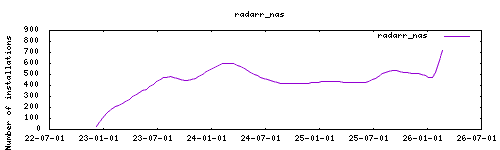
About
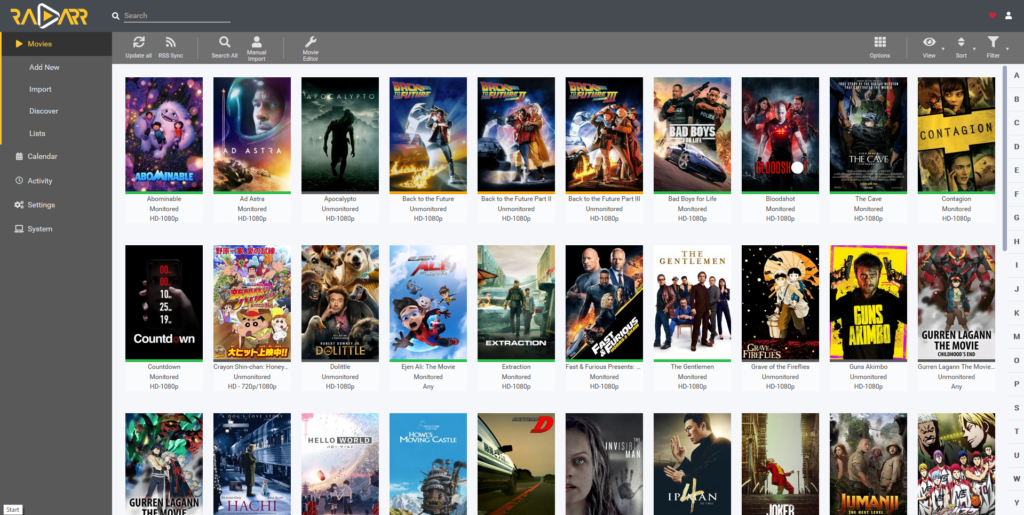
Radarr Radarr is a movie collection manager for Usenet and BitTorrent users. It can monitor multiple RSS feeds for new movies and will interface with clients and indexers to grab, sort, and rename them. It can also be configured to automatically upgrade the quality of existing files in the library when a better quality format becomes available. This addon is based on the docker image https://github.com/linuxserver/docker-radarr
Installation
The installation of this add-on is pretty straightforward and not different in comparison to installing any other add-on.
- Add my add-ons repository to your home assistant instance (in supervisor addons store at top right, or click button below if you have configured my HA)

- Install this add-on.
- Click the
Savebutton to store your configuration. - Set the add-on options to your preferences
- Start the add-on.
- Check the logs of the add-on to see if everything went well.
- Open the webUI and adapt the software options
Configuration
Use the add-on env_vars option to pass extra environment variables (uppercase or lowercase names). See https://github.com/alexbelgium/hassio-addons/wiki/Add-Environment-variables-to-your-Addon-2 for details.
Webui can be found at http://homeassistant:PORT or through the sidebar using Ingress. Configurations can be done through the app webUI, except for the following options.
Options
| Option | Type | Default | Description |
|---|---|---|---|
PGID |
int | 0 |
Group ID for file permissions |
PUID |
int | 0 |
User ID for file permissions |
TZ |
str | Timezone (e.g., Europe/London) |
|
connection_mode |
list | ingress_noauth |
Connection mode (ingress_noauth/noingress_auth/ingress_auth) |
localdisks |
str | Local drives to mount (e.g., sda1,sdb1,MYNAS) |
|
networkdisks |
str | SMB shares to mount (e.g., //SERVER/SHARE) |
|
cifsusername |
str | SMB username for network shares | |
cifspassword |
str | SMB password for network shares | |
cifsdomain |
str | SMB domain for network shares |
Connection Modes
ingress_noauth- Default, disables authentication for seamless ingress integrationnoingress_auth- Disables ingress for external URL, enables authenticationingress_auth- Enables both ingress and authentication
Example Configuration
PGID: 0
PUID: 0
TZ: "Europe/London"
connection_mode: "ingress_noauth"
localdisks: "sda1,sdb1"
networkdisks: "//192.168.1.100/downloads,//nas.local/movies"
cifsusername: "mediauser"
cifspassword: "password123"
cifsdomain: "workgroup"
Mounting Drives
This addon supports mounting both local drives and remote SMB shares:
- Local drives: See Mounting Local Drives in Addons
- Remote shares: See Mounting Remote Shares in Addons
Support
Create an issue on github
Illustration