eb2add5dd8
*Total -- 3,537.52kb -> 2,877.78kb (18.65%)

/enedisgateway2mqtt/icon.png -- 6.34kb -> 2.15kb (66.02%)
/enedisgateway2mqtt/logo.png -- 6.34kb -> 2.15kb (66.02%)
/enedisgateway2mqtt_dev/icon.png -- 6.34kb -> 2.15kb (66.02%)
/enedisgateway2mqtt_dev/logo.png -- 6.34kb -> 2.15kb (66.02%)
/xteve/icon.png -- 3.68kb -> 1.31kb (64.45%)
/xteve/logo.png -- 3.68kb -> 1.31kb (64.45%)
/mealie/logo.png -- 7.05kb -> 3.54kb (49.74%)
/mealie/icon.png -- 7.05kb -> 3.54kb (49.74%)
/requestrr/logo.png -- 61.16kb -> 35.90kb (41.3%)
/requestrr/icon.png -- 61.16kb -> 35.90kb (41.3%)
/scrutiny/logo.png -- 38.08kb -> 24.25kb (36.3%)
/scrutiny/icon.png -- 38.08kb -> 24.25kb (36.3%)
/resiliosync/logo.png -- 412.14kb -> 274.81kb (33.32%)
/resiliosync/icon.png -- 412.14kb -> 274.81kb (33.32%)
/ombi/icon.png -- 9.22kb -> 6.22kb (32.5%)
/ombi/logo.png -- 9.22kb -> 6.22kb (32.5%)
/portainer/icon.png -- 4.73kb -> 3.29kb (30.48%)
/portainer/logo.png -- 4.73kb -> 3.29kb (30.48%)
/flexget/icon.png -- 110.01kb -> 78.31kb (28.81%)
/flexget/logo.png -- 110.01kb -> 78.31kb (28.81%)
/grav/icon.png -- 45.24kb -> 32.96kb (27.14%)
/grav/logo.png -- 45.24kb -> 32.96kb (27.14%)
/flaresolverr/icon.png -- 7.38kb -> 5.45kb (26.17%)
/flaresolverr/logo.png -- 7.38kb -> 5.45kb (26.17%)
/nzbget/icon.png -- 5.25kb -> 3.94kb (24.94%)
/nzbget/logo.png -- 5.25kb -> 3.94kb (24.94%)
/bitwarden/icon.png -- 8.69kb -> 6.76kb (22.17%)
/bitwarden/logo.png -- 8.69kb -> 6.76kb (22.17%)
/prowlarr/icon.png -- 25.81kb -> 20.11kb (22.06%)
/prowlarr/logo.png -- 25.81kb -> 20.11kb (22.06%)
/filebrowser/icon.png -- 19.64kb -> 15.43kb (21.44%)
/filebrowser/logo.png -- 19.64kb -> 15.43kb (21.44%)
/qbittorrent/icon.png -- 55.73kb -> 43.97kb (21.1%)
/qbittorrent/logo.png -- 55.73kb -> 43.97kb (21.1%)
/lidarr/icon.png -- 40.48kb -> 32.19kb (20.48%)
/lidarr/logo.png -- 40.48kb -> 32.19kb (20.48%)
/wger/icon.png -- 8.29kb -> 6.71kb (19.12%)
/wger/logo.png -- 8.29kb -> 6.71kb (19.12%)
/radarr/icon.png -- 14.01kb -> 11.40kb (18.61%)
/radarr/logo.png -- 14.01kb -> 11.40kb (18.61%)
/qbittorrent/illustration.png -- 188.84kb -> 154.95kb (17.95%)
/readarr/icon.png -- 17.92kb -> 14.95kb (16.59%)
/readarr/logo.png -- 17.92kb -> 14.95kb (16.59%)
/organizr/icon.png -- 21.72kb -> 18.67kb (14.03%)
/organizr/logo.png -- 21.72kb -> 18.67kb (14.03%)
/papermerge/icon.png -- 5.70kb -> 4.96kb (12.91%)
/papermerge/logo.png -- 5.70kb -> 4.96kb (12.91%)
/whoogle/logo.png -- 73.51kb -> 65.13kb (11.4%)
/whoogle/icon.png -- 73.51kb -> 65.13kb (11.4%)
/webtop/logo.png -- 38.12kb -> 34.14kb (10.43%)
/webtop/icon.png -- 38.12kb -> 34.14kb (10.43%)
/code-server/logo.png -- 20.58kb -> 19.10kb (7.18%)
/code-server/icon.png -- 20.58kb -> 19.10kb (7.18%)
/fireflyiii_data_importer/icon.png -- 72.15kb -> 69.31kb (3.93%)
/fireflyiii_data_importer/logo.png -- 72.15kb -> 69.31kb (3.93%)
/fireflyiii/icon.png -- 142.75kb -> 137.22kb (3.87%)
/fireflyiii/logo.png -- 142.75kb -> 137.22kb (3.87%)
/transmission/icon.png -- 18.11kb -> 17.68kb (2.36%)
/transmission/logo.png -- 18.11kb -> 17.68kb (2.36%)
/joal/icon.png -- 128.96kb -> 126.06kb (2.25%)
/joal/logo.png -- 128.96kb -> 126.06kb (2.25%)
/booksonic_air/logo.png -- 38.86kb -> 38.08kb (2%)
/booksonic_air/icon.png -- 38.86kb -> 38.08kb (2%)
/ubooquity/icon.png -- 22.41kb -> 22.00kb (1.83%)
/ubooquity/logo.png -- 22.41kb -> 22.00kb (1.83%)
/paperless_ng/icon.png -- 101.25kb -> 100.42kb (0.82%)
/paperless_ng/logo.png -- 101.25kb -> 100.42kb (0.82%)
/jellyfin/icon.png -- 29.12kb -> 28.89kb (0.79%)
/jellyfin/logo.png -- 29.12kb -> 28.89kb (0.79%)
/teamspeak/logo.png -- 53.93kb -> 53.92kb (0.02%)
/teamspeak/icon.png -- 53.93kb -> 53.92kb (0.02%)

Signed-off-by: ImgBotApp <ImgBotHelp@gmail.com>
Home assistant add-on: qbittorrent



Thanks to everyone having starred my repo! To star it click on the image below, then it will be on top right. Thanks!
About
Qbittorrent is a cross-platform free and open-source BitTorrent client. This addon is based on the docker image from linuxserver.io.
This addons has several configurable options :
- allowing to mount local external drive, or smb share from the addon
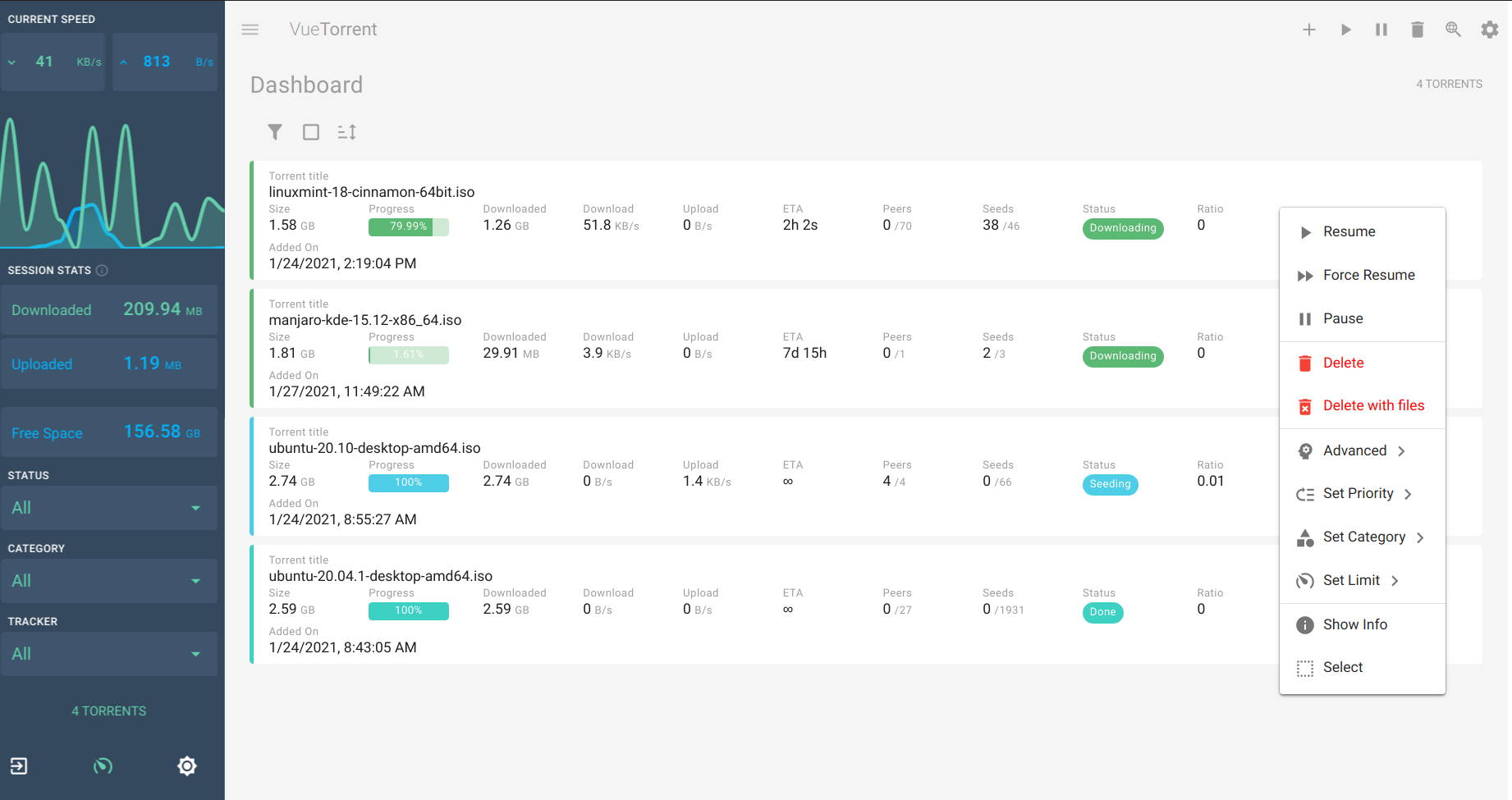
- alternative webUI
- usage of ssl
- ingress
- optional openvpn support
- allow setting specific DNS servers
Installation
The installation of this add-on is pretty straightforward and not different in comparison to installing any other add-on.
- Add my add-ons repository to your home assistant instance (in supervisor addons store at top right, or click button below if you have configured my HA)

- Install this add-on.
- Click the
Savebutton to store your configuration. - Set the add-on options to your preferences
- Start the add-on.
- Check the logs of the add-on to see if everything went well.
- Open the webUI and adapt the software options
Configuration
Webui can be found at http://your-ip:8080, or in your sidebar using Ingress. The default username/password : described in the startup log. Configurations can be done through the app webUI, except for the following options
Network disk is mounted to /mnt/share name
GUID: user
GPID: user
ssl: true/false
certfile: fullchain.pem #ssl certificate, must be located in /ssl
keyfile: privkey.pem #sslkeyfile, must be located in /ssl
whitelist: "localhost,192.168.0.0/16" # list ip subnets that won't need a password (optional)
Username: "admin" #username to access webui. Please change it as the default is admin for all installations.
customUI: selection from list # alternative webUI can be set here. Latest version set at each addon start.
DNS_servers : 8.8.8.8,1.1.1.1 # Keep blank to use router’s DNS, or set custom DNS to avoid spamming in case of local DNS ad-remover
SavePath: "/share/qbittorrent" # Define the download directory
localdisks: sda1 #put the hardware name of your drive to mount separated by commas, or its label. Ex: sda1, sdb1, MYNAS...
networkdisks: "//SERVER/SHARE" # optional, list of smb servers to mount, separated by commas
cifsusername: "username" # optional, smb username, same for all smb shares
cifspassword: "password" # optional, smb password
cifsdomain: "domain" # optional, allow setting the domain for the smb share
openvpn_enabled: true/false # is openvpn required to start qbittorrent
openvpn_alternative_mode: true/false # if enabled, will tunnel only qbittorrent and not webui through vpn. Allows webui connection from external networks, but risk of decreased stability.
openvpn_config": For example "config.ovpn" # name of the file located in /config/openvpn.
openvpn_username": USERNAME
openvpn_password: YOURPASSWORD
run_duration: 12h #for how long should the addon run. Must be formatted as number + time unit (ex : 5s, or 2m, or 12h, or 5d...)
Integration with HA
Use the qBittorrent integration
Support
Create an issue on github, or ask on the home assistant thread
Illustration (vuetorrent webui)