mirror of
https://github.com/alexbelgium/hassio-addons.git
synced 2026-08-22 12:53:32 +02:00

152 lines
7.8 KiB
Markdown
152 lines
7.8 KiB
Markdown
# Home assistant add-on: Collabora
|
|
|
|
|
|
I maintain this and other Home Assistant add-ons in my free time: keeping up with upstream changes, HA changes, and testing on real hardware takes a lot of time (and some money). I use around 5-10 of my >110 addons so regularly I install test machines (and purchase some test services such as vpn) that I don't use myself to troubleshoot and improve the addons
|
|
|
|
If this add-on saves you time or makes your setup easier, I would be very grateful for your support!
|
|
|
|
[![Buy me a coffee][donation-badge]](https://www.buymeacoffee.com/alexbelgium)
|
|
[![Donate via PayPal][paypal-badge]](https://www.paypal.com/donate/?hosted_button_id=DZFULJZTP3UQA)
|
|
|
|
## Addon informations
|
|
|
|

|
|

|
|

|
|
|
|
[](https://www.codacy.com/gh/alexbelgium/hassio-addons/dashboard?utm_source=github.com&utm_medium=referral&utm_content=alexbelgium/hassio-addons&utm_campaign=Badge_Grade)
|
|
[](https://github.com/alexbelgium/hassio-addons/actions/workflows/weekly-supelinter.yaml)
|
|
[](https://github.com/alexbelgium/hassio-addons/actions/workflows/onpush_builder.yaml)
|
|
|
|
[donation-badge]: https://img.shields.io/badge/Buy%20me%20a%20coffee-%23d32f2f?logo=buy-me-a-coffee&style=flat&logoColor=white
|
|
[paypal-badge]: https://img.shields.io/badge/Donate%20via%20PayPal-0070BA?logo=paypal&style=flat&logoColor=white
|
|
|
|
_Thanks to everyone having starred my repo! To star it click on the image below, then it will be on top right. Thanks!_
|
|
|
|
[](https://github.com/alexbelgium/hassio-addons/stargazers)
|
|
|
|
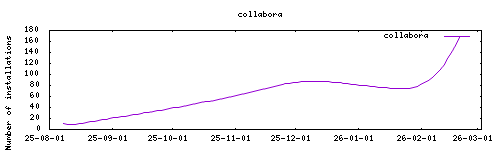
|
|
|
|
## About
|
|
|
|
Collabora Online is a collaborative office suite based on LibreOffice technology.
|
|
|
|
## Installation
|
|
|
|
---
|
|
|
|
1. Add my add-ons repository to your Home Assistant instance or click the My link below.
|
|
1. Install the add-on.
|
|
1. Start the add-on.
|
|
1. Check the add-on logs to verify successful startup.
|
|
|
|
<a href="https://my.home-assistant.io/redirect/supervisor_addon/?addon=local_collabora" target="_blank"><img src="https://my.home-assistant.io/badges/supervisor_addon.svg" alt="Open your Home Assistant instance and show the add add-on repository dialog"/></a>
|
|
|
|
## Configuration
|
|
|
|
---
|
|
|
|
Webui can be found at `https://homeassistant:9980/browser/dist/admin/admin.html`.
|
|
|
|
### Options
|
|
|
|
| Option | Type | Default | Description |
|
|
|--------|------|---------|-------------|
|
|
| `aliasgroup1` | str | | External address of the **Nextcloud** server allowed to use this Collabora (e.g. `https://nextcloud_domain\.com:443`) |
|
|
| `aliasgroup2` | str | | A second Nextcloud server, same format as `aliasgroup1` |
|
|
| `aliasgroup3` | str | | A third Nextcloud server, same format as `aliasgroup1` |
|
|
| `server_name` | str | | External hostname (and port) of **this Collabora** server, as the browser reaches it (e.g. `code_domain.com:9980`). Set it when Collabora sits behind a reverse proxy |
|
|
| `ssl_termination` | bool | `false` | Set to `true` when `ssl` is `false` but the browser reaches Collabora over `https` through a reverse proxy |
|
|
| `extra_params` | str | | Extra parameters passed to the Collabora start script |
|
|
| `ssl` | bool | `false` | Enable SSL using certificates from /ssl |
|
|
| `certfile` | str | `fullchain.pem` | Certificate file name located in /ssl |
|
|
| `keyfile` | str | `privkey.pem` | Private key file name located in /ssl |
|
|
| `cert_domain` | str | | Common name of the self-signed certificate generated when `ssl` is `false` |
|
|
| `username` | str | | Username for the Collabora admin console |
|
|
| `password` | str | | Password for the Collabora admin console |
|
|
| `dictionaries` | str | | Space-separated list of dictionary languages to install |
|
|
| `domain1` | str | | **Deprecated**, use `server_name` instead |
|
|
|
|
#### About the escaped dots in `aliasgroup*`
|
|
|
|
Collabora matches the `aliasgroup*` addresses as **regular expressions**, so a dot
|
|
has to be escaped with a **single** backslash: `next\.duckdns\.org`, not
|
|
`next\\.duckdns\\.org`. A doubled backslash means "a literal backslash followed by
|
|
any character", which never matches a real hostname, and Collabora then rejects the
|
|
Nextcloud server.
|
|
|
|
Earlier versions of this page asked for two backslashes, which was wrong. The add-on
|
|
now normalises whatever you type, so `next.duckdns.org`, `next\.duckdns\.org` and
|
|
`next\\.duckdns\\.org` all end up as the same correct pattern. The value that is
|
|
really handed to Collabora is printed in the add-on log at startup:
|
|
|
|
```text
|
|
Allowed Nextcloud host aliasgroup1: https://next\.duckdns\.org:443
|
|
```
|
|
|
|
Values containing other regex characters (`*`, `|`, `(`, `[`, …) are left untouched,
|
|
so hand-written patterns keep working.
|
|
|
|
`server_name` is **not** a regular expression: write it as a plain hostname, without
|
|
backslashes.
|
|
|
|
### Example configuration
|
|
|
|
Nextcloud on `https://next.duckdns.org` and Collabora reachable on
|
|
`https://code.duckdns.org:9980`, with a reverse proxy handling the certificates:
|
|
|
|
```yaml
|
|
aliasgroup1: https://next\.duckdns\.org:443
|
|
server_name: code.duckdns.org:9980
|
|
ssl_termination: true
|
|
ssl: false
|
|
username: admin
|
|
password: changeme
|
|
```
|
|
|
|
Same setup, but letting the add-on serve the certificates itself from `/ssl`:
|
|
|
|
```yaml
|
|
aliasgroup1: https://next\.duckdns\.org:443
|
|
server_name: code.duckdns.org:9980
|
|
ssl: true
|
|
certfile: fullchain.pem
|
|
keyfile: privkey.pem
|
|
username: admin
|
|
password: changeme
|
|
```
|
|
|
|
### Using Collabora with Nextcloud
|
|
|
|
1. Install the Collabora add-on and configure the options above.
|
|
1. Start the add-on and expose the Collabora server to an external domain.
|
|
1. Install and configure the Nextcloud add-on.
|
|
1. Inside Nextcloud, install the **Nextcloud Office** app.
|
|
1. In Nextcloud **Administration Settings → Office**, set the Collabora server URL to
|
|
the **Collabora** address, not the Nextcloud one — with the example above that is
|
|
`https://code.duckdns.org:9980` — and enable **Disable certificate validation** if
|
|
the add-on serves a self-signed certificate.
|
|
1. Add both hostnames to the Nextcloud `trusted_domains`.
|
|
|
|
The two hostnames have different roles, and swapping them is the most common cause of
|
|
`Could not establish connection to the Collabora Online server`:
|
|
|
|
- `aliasgroup1` is the **Nextcloud** address, it tells Collabora which server is
|
|
allowed to ask it to open documents.
|
|
- `server_name` is the **Collabora** address, it tells Collabora which URL to hand
|
|
back to the browser.
|
|
|
|
### Custom Scripts and Environment Variables
|
|
|
|
This addon supports custom scripts and environment variables through the `addon_config` mapping:
|
|
|
|
- **Custom scripts**: See [Running Custom Scripts in Addons](https://github.com/alexbelgium/hassio-addons/wiki/Running-custom-scripts-in-Addons)
|
|
- **env_vars option**: Use the add-on `env_vars` option to pass extra environment variables (uppercase or lowercase names). See https://github.com/alexbelgium/hassio-addons/wiki/Add-Environment-variables-to-your-Addon-2 for details.
|
|
|
|
## Support
|
|
|
|
Create an issue on GitHub
|
|
|
|
|
|
|