mirror of
https://github.com/alexbelgium/hassio-addons.git
synced 2026-01-09 17:31:03 +01:00

119 lines
6.3 KiB
Markdown
119 lines
6.3 KiB
Markdown
# Home assistant add-on: calibre
|
||
|
||
|
||
I maintain this and other Home Assistant add-ons in my free time: keeping up with upstream changes, HA changes, and testing on real hardware takes a lot of time (and some money). I use around 5-10 of my >110 addons so regularly I install test machines (and purchase some test services such as vpn) that I don't use myself to troubleshoot and improve the addons
|
||
|
||
If this add-on saves you time or makes your setup easier, I would be very grateful for your support!
|
||
|
||
[![Buy me a coffee][donation-badge]](https://www.buymeacoffee.com/alexbelgium)
|
||
[![Donate via PayPal][paypal-badge]](https://www.paypal.com/donate/?hosted_button_id=DZFULJZTP3UQA)
|
||
|
||
## Addon informations
|
||
|
||

|
||

|
||

|
||
|
||
[](https://www.codacy.com/gh/alexbelgium/hassio-addons/dashboard?utm_source=github.com&utm_medium=referral&utm_content=alexbelgium/hassio-addons&utm_campaign=Badge_Grade)
|
||
[](https://github.com/alexbelgium/hassio-addons/actions/workflows/weekly-supelinter.yaml)
|
||
[](https://github.com/alexbelgium/hassio-addons/actions/workflows/onpush_builder.yaml)
|
||
|
||
[donation-badge]: https://img.shields.io/badge/Buy%20me%20a%20coffee-%23d32f2f?logo=buy-me-a-coffee&style=flat&logoColor=white
|
||
[paypal-badge]: https://img.shields.io/badge/Donate%20via%20PayPal-0070BA?logo=paypal&style=flat&logoColor=white
|
||
|
||
_Thanks to everyone having starred my repo! To star it click on the image below, then it will be on top right. Thanks!_
|
||
|
||
[](https://github.com/alexbelgium/hassio-addons/stargazers)
|
||
|
||
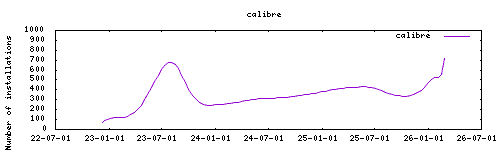
|
||
|
||
## About
|
||
|
||
---
|
||
|
||
[Calibre](https://calibre-ebook.com/) is a powerful and easy to use e-book manager. Users say it’s outstanding and a must-have. It’ll allow you to do nearly everything and it takes things a step beyond normal e-book software. It’s also completely free and open source and great for both casual users and computer experts.
|
||
|
||
This addon is based on the docker image https://github.com/linuxserver/docker-calibre
|
||
|
||
## Installation
|
||
|
||
---
|
||
|
||
The installation of this add-on is pretty straightforward and not different in comparison to installing any other add-on.
|
||
|
||
1. Add my add-ons repository to your home assistant instance (in supervisor addons store at top right, or click button below if you have configured my HA)
|
||
[](https://my.home-assistant.io/redirect/supervisor_add_addon_repository/?repository_url=https%3A%2F%2Fgithub.com%2Falexbelgium%2Fhassio-addons)
|
||
1. Install this add-on.
|
||
1. Click the `Save` button to store your configuration.
|
||
1. Set the add-on options to your preferences
|
||
1. Start the add-on.
|
||
1. Check the logs of the add-on to see if everything went well.
|
||
1. Open the webUI and adapt the software options
|
||
|
||
## Configuration
|
||
|
||
---
|
||
|
||
Webui can be found at <http://homeassistant:PORT> or through the sidebar using Ingress.
|
||
Please read the upstream container documentation for further info: https://github.com/linuxserver/docker-calibre#application-setup
|
||
|
||
**Note**: The webserver and wireless connection need to be manually enabled from the desktop app, using ports 8081 and 9090 respectively.
|
||
|
||
### Options
|
||
|
||
| Option | Type | Default | Description |
|
||
|--------|------|---------|-------------|
|
||
| `PGID` | int | `0` | Group ID for file permissions |
|
||
| `PUID` | int | `0` | User ID for file permissions |
|
||
| `TZ` | str | | Timezone (e.g., `Europe/London`) |
|
||
| `PASSWORD` | str | | Optional password for GUI access |
|
||
| `CLI_ARGS` | str | | Optional CLI start arguments for Calibre |
|
||
| `localdisks` | str | | Local drives to mount (e.g., `sda1,sdb1,MYNAS`) |
|
||
| `networkdisks` | str | | SMB shares to mount (e.g., `//SERVER/SHARE`) |
|
||
| `cifsusername` | str | | SMB username for network shares |
|
||
| `cifspassword` | str | | SMB password for network shares |
|
||
| `cifsdomain` | str | | SMB domain for network shares |
|
||
|
||
### Example Configuration
|
||
|
||
```yaml
|
||
PGID: 0
|
||
PUID: 0
|
||
TZ: "Europe/London"
|
||
PASSWORD: "secure-password"
|
||
CLI_ARGS: "--with-library=/books"
|
||
localdisks: "sda1,sdb1"
|
||
networkdisks: "//192.168.1.100/books"
|
||
cifsusername: "bookuser"
|
||
cifspassword: "password123"
|
||
cifsdomain: "workgroup"
|
||
```
|
||
|
||
### Mounting Drives
|
||
|
||
This addon supports mounting both local drives and remote SMB shares:
|
||
|
||
- **Local drives**: See [Mounting Local Drives in Addons](https://github.com/alexbelgium/hassio-addons/wiki/Mounting-Local-Drives-in-Addons)
|
||
- **Remote shares**: See [Mounting Remote Shares in Addons](https://github.com/alexbelgium/hassio-addons/wiki/Mounting-remote-shares-in-Addons)
|
||
|
||
### Custom Scripts and Environment Variables
|
||
|
||
This addon supports custom scripts and environment variables through the `addon_config` mapping:
|
||
|
||
- **Custom scripts**: See [Running Custom Scripts in Addons](https://github.com/alexbelgium/hassio-addons/wiki/Running-custom-scripts-in-Addons)
|
||
- **env_vars option**: Use the add-on `env_vars` option to pass extra environment variables (uppercase or lowercase names). See https://github.com/alexbelgium/hassio-addons/wiki/Add-Environment-variables-to-your-Addon-2 for details.
|
||
|
||
## Support
|
||
|
||
Create an issue on github
|
||
|
||
## Illustration
|
||
|
||
---
|
||
|
||

|
||
|
||
[repository]: https://github.com/alexbelgium/hassio-addons
|
||
|
||
|