mirror of
https://github.com/alexbelgium/hassio-addons.git
synced 2026-01-10 09:51:02 +01:00

96 lines
5.6 KiB
Markdown
96 lines
5.6 KiB
Markdown
# Home assistant add-on: changedetection.io
|
||
|
||
|
||
I maintain this and other Home Assistant add-ons in my free time: keeping up with upstream changes, HA changes, and testing on real hardware takes a lot of time (and some money). I use around 5-10 of my >110 addons so regularly I install test machines (and purchase some test services such as vpn) that I don't use myself to troubleshoot and improve the addons
|
||
|
||
If this add-on saves you time or makes your setup easier, I would be very grateful for your support!
|
||
|
||
[![Buy me a coffee][donation-badge]](https://www.buymeacoffee.com/alexbelgium)
|
||
[![Donate via PayPal][paypal-badge]](https://www.paypal.com/donate/?hosted_button_id=DZFULJZTP3UQA)
|
||
|
||
## Addon informations
|
||
|
||

|
||

|
||

|
||
|
||
[](https://www.codacy.com/gh/alexbelgium/hassio-addons/dashboard?utm_source=github.com&utm_medium=referral&utm_content=alexbelgium/hassio-addons&utm_campaign=Badge_Grade)
|
||
[](https://github.com/alexbelgium/hassio-addons/actions/workflows/weekly-supelinter.yaml)
|
||
[](https://github.com/alexbelgium/hassio-addons/actions/workflows/onpush_builder.yaml)
|
||
|
||
[donation-badge]: https://img.shields.io/badge/Buy%20me%20a%20coffee-%23d32f2f?logo=buy-me-a-coffee&style=flat&logoColor=white
|
||
[paypal-badge]: https://img.shields.io/badge/Donate%20via%20PayPal-0070BA?logo=paypal&style=flat&logoColor=white
|
||
|
||
_Thanks to everyone having starred my repo! To star it click on the image below, then it will be on top right. Thanks!_
|
||
|
||
[](https://github.com/alexbelgium/hassio-addons/stargazers)
|
||
|
||
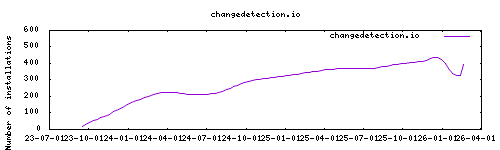
|
||
|
||
## About
|
||
|
||
[Changedetection.io](https://github.com/dgtlmoon/changedetection.io) provides free, open-source web page monitoring, notification and change detection.
|
||
|
||
This addon is based on the [docker image](https://github.com/linuxserver/docker-changedetection.io) from linuxserver.io.
|
||
|
||
## Configuration
|
||
|
||
Use the add-on `env_vars` option to pass extra environment variables (uppercase or lowercase names). See https://github.com/alexbelgium/hassio-addons/wiki/Add-Environment-variables-to-your-Addon-2 for details.
|
||
|
||
### Main app
|
||
|
||
Web UI can be found at `<your-ip>:5000`, also accessible from the add-on page.
|
||
|
||
#### Sidebar shortcut
|
||
|
||
You can add a shortcut pointing to your Changedetection.io instance with the following steps:
|
||
1. Go to <kbd>⚙ Settings</kbd> > <kbd>Dashboards</kbd>
|
||
2. Click <kbd>➕ Add Dashboard</kbd> at the bottom corner
|
||
3. Select the <kbd>Webpage</kbd> option, and paste the Web UI URL you got from the add-on page.
|
||
4. Fill in the title for the sidebar item, an icon (suggestion: `mdi:vector-difference`), and a **relative URL** for that panel (e.g. `change-detection`). Lastly, confirm it.
|
||
|
||
### Options
|
||
|
||
| Option | Type | Default | Description |
|
||
|--------|------|---------|-------------|
|
||
| `PGID` | int | `0` | Group ID for file permissions |
|
||
| `PUID` | int | `0` | User ID for file permissions |
|
||
| `TZ` | str | | Timezone (e.g., `Europe/London`) |
|
||
| `BASE_URL` | str | | Full URL when running behind reverse proxy |
|
||
| `PLAYWRIGHT_DRIVER_URL` | str | | Playwright driver WebSocket URL |
|
||
| `TIMEOUT` | int | `60000` | Request timeout in milliseconds |
|
||
|
||
### Example Configuration
|
||
|
||
```yaml
|
||
PGID: 0
|
||
PUID: 0
|
||
TZ: "Europe/London"
|
||
BASE_URL: "https://changedetection.mydomain.com"
|
||
PLAYWRIGHT_DRIVER_URL: "ws://db21ed7f-browserless-chrome:3000/chromium?headless=true&stealth=true&blockAds=true"
|
||
TIMEOUT: 60000
|
||
```
|
||
|
||
### Connect to browserless Chrome (from @RhysMcW)
|
||
|
||
Install and start the Browserless Chrome add-on, then use the `PLAYWRIGHT_DRIVER_URL` option to connect to it. This option must be filled with the Browserless Chrome URL: "ws://db21ed7f-browserless-chrome:3000/chromium?headless=true&stealth=true&blockAds=true"
|
||
|
||
The `db21ed7f-browserless-chrome` hostname is displayed in the UI, on the Browserless Chromium addon page:
|
||

|
||
|
||
Then restart the Changedetection.io add-on - after that you can use the browser options in Changedetection.io.
|
||
|
||
## Installation
|
||
|
||
The installation of this add-on is pretty straightforward and not different in
|
||
comparison to installing any other Hass.io add-on.
|
||
|
||
1. [Add my Hass.io add-ons repository][repository] to your Hass.io instance.
|
||
1. Install this add-on.
|
||
1. Click the `Save` button to store your configuration.
|
||
1. Start the add-on.
|
||
1. Check the logs of the add-on to see if everything went well.
|
||
1. Carefully configure the add-on to your preferences, see the official documentation for for that.
|
||
|
||
[repository]: https://github.com/alexbelgium/hassio-addons
|