mirror of
https://github.com/alexbelgium/hassio-addons.git
synced 2026-01-09 17:31:03 +01:00

156 lines
7.4 KiB
Markdown
156 lines
7.4 KiB
Markdown
# Home assistant add-on: Grampsweb
|
|
|
|
|
|
I maintain this and other Home Assistant add-ons in my free time: keeping up with upstream changes, HA changes, and testing on real hardware takes a lot of time (and some money). I use around 5-10 of my >110 addons so regularly I install test machines (and purchase some test services such as vpn) that I don't use myself to troubleshoot and improve the addons
|
|
|
|
If this add-on saves you time or makes your setup easier, I would be very grateful for your support!
|
|
|
|
[![Buy me a coffee][donation-badge]](https://www.buymeacoffee.com/alexbelgium)
|
|
[![Donate via PayPal][paypal-badge]](https://www.paypal.com/donate/?hosted_button_id=DZFULJZTP3UQA)
|
|
|
|
## Addon informations
|
|
|
|

|
|

|
|

|
|
|
|
[](https://www.codacy.com/gh/alexbelgium/hassio-addons/dashboard?utm_source=github.com&utm_medium=referral&utm_content=alexbelgium/hassio-addons&utm_campaign=Badge_Grade)
|
|
[](https://github.com/alexbelgium/hassio-addons/actions/workflows/weekly-supelinter.yaml)
|
|
[](https://github.com/alexbelgium/hassio-addons/actions/workflows/onpush_builder.yaml)
|
|
|
|
[donation-badge]: https://img.shields.io/badge/Buy%20me%20a%20coffee-%23d32f2f?logo=buy-me-a-coffee&style=flat&logoColor=white
|
|
[paypal-badge]: https://img.shields.io/badge/Donate%20via%20PayPal-0070BA?logo=paypal&style=flat&logoColor=white
|
|
|
|
_Thanks to everyone having starred my repo! To star it click on the image below, then it will be on top right. Thanks!_
|
|
|
|
[](https://github.com/alexbelgium/hassio-addons/stargazers)
|
|
|
|
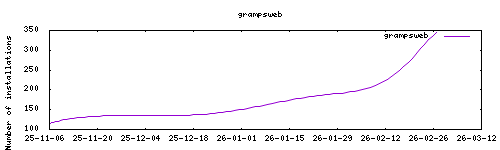
|
|
|
|
## About
|
|
|
|
---
|
|
|
|
[Gramps Web](https://github.com/gramps-project/gramps-web) is a web application for creating and sharing family trees. It's the web frontend for Gramps, the free and open-source genealogy software.
|
|
|
|
Gramps Web offers:
|
|
- Modern web interface for genealogy research
|
|
- Multi-user support with user management
|
|
- Rich media support (photos, documents, etc.)
|
|
- Advanced search and filtering capabilities
|
|
- Charts and reports generation
|
|
- Import/export capabilities for various formats
|
|
- RESTful API for integrations
|
|
|
|
This addon is based on the official Gramps Web project: https://github.com/gramps-project/gramps-web
|
|
|
|
## Configuration
|
|
|
|
---
|
|
|
|
Webui can be found at <http://homeassistant:5000>.
|
|
|
|
### Options
|
|
|
|
| Option | Type | Default | Description |
|
|
|--------|------|---------|-------------|
|
|
| `CELERY_NUM_WORKERS` | int | `2` | Number of Celery workers for background tasks |
|
|
| `GUNICORN_NUM_WORKERS` | int | `8` | Number of Gunicorn workers for web requests |
|
|
| `GRAMPSWEB_SECRET_KEY` | str | - | Secret key for session security (auto-generated if not set) |
|
|
| `GRAMPSWEB_BASE_URL` | str | - | Base URL for the application |
|
|
| `ssl` | bool | `false` | Enable SSL/TLS |
|
|
| `certfile` | str | `fullchain.pem` | SSL certificate file |
|
|
| `keyfile` | str | `privkey.pem` | SSL private key file |
|
|
|
|
### Email Configuration (Optional)
|
|
|
|
| Option | Type | Description |
|
|
|--------|------|-------------|
|
|
| `GRAMPSWEB_EMAIL_HOST` | str | SMTP server hostname |
|
|
| `GRAMPSWEB_EMAIL_PORT` | int | SMTP server port |
|
|
| `GRAMPSWEB_EMAIL_USE_TLS` | bool | Use TLS encryption |
|
|
| `GRAMPSWEB_EMAIL_HOST_USER` | str | SMTP username |
|
|
| `GRAMPSWEB_EMAIL_HOST_PASSWORD` | str | SMTP password |
|
|
| `GRAMPSWEB_DEFAULT_FROM_EMAIL` | str | Default sender email address |
|
|
|
|
### Example Configuration
|
|
|
|
```yaml
|
|
CELERY_NUM_WORKERS: 2
|
|
GUNICORN_NUM_WORKERS: 8
|
|
GRAMPSWEB_SECRET_KEY: "your-secret-key-here"
|
|
GRAMPSWEB_BASE_URL: "https://gramps.example.com"
|
|
ssl: true
|
|
certfile: "fullchain.pem"
|
|
keyfile: "privkey.pem"
|
|
GRAMPSWEB_EMAIL_HOST: "smtp.gmail.com"
|
|
GRAMPSWEB_EMAIL_PORT: 587
|
|
GRAMPSWEB_EMAIL_USE_TLS: true
|
|
GRAMPSWEB_EMAIL_HOST_USER: "your-email@gmail.com"
|
|
GRAMPSWEB_EMAIL_HOST_PASSWORD: "your-app-password"
|
|
GRAMPSWEB_DEFAULT_FROM_EMAIL: "gramps@example.com"
|
|
```
|
|
|
|
### Custom Scripts and Environment Variables
|
|
|
|
This addon supports custom scripts and environment variables through the `addon_config` mapping:
|
|
|
|
- **Custom scripts**: See [Running Custom Scripts in Addons](https://github.com/alexbelgium/hassio-addons/wiki/Running-custom-scripts-in-Addons)
|
|
- **env_vars option**: Use the add-on `env_vars` option to pass extra environment variables (uppercase or lowercase names). See https://github.com/alexbelgium/hassio-addons/wiki/Add-Environment-variables-to-your-Addon-2 for details.
|
|
|
|
## Installation
|
|
|
|
---
|
|
|
|
The installation of this add-on is pretty straightforward and not different in comparison to installing any other add-on.
|
|
|
|
1. Add my add-ons repository to your home assistant instance (in supervisor addons store at top right, or click button below if you have configured my HA)
|
|
[](https://my.home-assistant.io/redirect/supervisor_add_addon_repository/?repository_url=https%3A%2F%2Fgithub.com%2Falexbelgium%2Fhassio-addons)
|
|
1. Install this add-on.
|
|
1. Click the `Save` button to store your configuration.
|
|
1. Set the add-on options to your preferences
|
|
1. Start the add-on.
|
|
1. Check the logs of the add-on to see if everything went well.
|
|
1. Open the webUI and set up your first user account
|
|
|
|
## First Time Setup
|
|
|
|
---
|
|
|
|
After starting the addon for the first time:
|
|
|
|
1. Navigate to the web interface
|
|
2. Create an admin user account
|
|
3. Set up your genealogy database
|
|
4. Import existing GEDCOM files or start creating your family tree
|
|
5. Configure user permissions and sharing settings
|
|
|
|
## Data Storage
|
|
|
|
The addon stores data in several locations within the `/config` directory:
|
|
- **Database**: `/config/config/` - Main Gramps database files
|
|
- **Media**: `/config/media/` - Photos, documents, and other media files
|
|
- **Users**: `/config/users/` - User accounts and authentication data
|
|
- **Cache**: `/config/cache/` - Temporary files and reports
|
|
- **Search Index**: `/config/indexdir/` - Search indexing data
|
|
|
|
## Backup Recommendations
|
|
|
|
For data safety, regularly backup:
|
|
- The entire `/config` directory (contains all data)
|
|
- Export GEDCOM files from the web interface
|
|
- Document your user accounts and permissions
|
|
|
|
## Performance Tuning
|
|
|
|
- **CELERY_NUM_WORKERS**: Adjust based on your system's CPU cores
|
|
- **GUNICORN_NUM_WORKERS**: Increase for more concurrent users
|
|
- Consider using an external MySQL/PostgreSQL database for better performance
|
|
|
|
## Support
|
|
|
|
Create an issue on github
|
|
|
|
[repository]: https://github.com/alexbelgium/hassio-addons
|
|
|