mirror of
https://github.com/alexbelgium/hassio-addons.git
synced 2026-01-10 09:51:02 +01:00

169 lines
8.3 KiB
Markdown
169 lines
8.3 KiB
Markdown
# Home assistant add-on: Scrutiny
|
|
|
|
|
|
I maintain this and other Home Assistant add-ons in my free time: keeping up with upstream changes, HA changes, and testing on real hardware takes a lot of time (and some money). I use around 5-10 of my >110 addons so regularly I install test machines (and purchase some test services such as vpn) that I don't use myself to troubleshoot and improve the addons
|
|
|
|
If this add-on saves you time or makes your setup easier, I would be very grateful for your support!
|
|
|
|
[![Buy me a coffee][donation-badge]](https://www.buymeacoffee.com/alexbelgium)
|
|
[![Donate via PayPal][paypal-badge]](https://www.paypal.com/donate/?hosted_button_id=DZFULJZTP3UQA)
|
|
|
|
## Addon informations
|
|
|
|

|
|

|
|

|
|
|
|
[](https://www.codacy.com/gh/alexbelgium/hassio-addons/dashboard?utm_source=github.com&utm_medium=referral&utm_content=alexbelgium/hassio-addons&utm_campaign=Badge_Grade)
|
|
[](https://github.com/alexbelgium/hassio-addons/actions/workflows/weekly-supelinter.yaml)
|
|
[](https://github.com/alexbelgium/hassio-addons/actions/workflows/onpush_builder.yaml)
|
|
|
|
[donation-badge]: https://img.shields.io/badge/Buy%20me%20a%20coffee-%23d32f2f?logo=buy-me-a-coffee&style=flat&logoColor=white
|
|
[paypal-badge]: https://img.shields.io/badge/Donate%20via%20PayPal-0070BA?logo=paypal&style=flat&logoColor=white
|
|
|
|
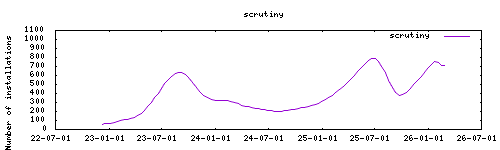
_Thanks to everyone having starred my repo! To star it click on the image below, then it will be on top right. Thanks!_
|
|
|
|
[](https://github.com/alexbelgium/hassio-addons/stargazers)
|
|
|
|
|
|
|
|
## About
|
|
|
|
---
|
|
|
|
[Scrutiny](https://github.com/AnalogJ/scrutiny) is a Hard Drive Health Dashboard & Monitoring solution, merging manufacturer provided S.M.A.R.T metrics with real-world failure rates. This addon is based on the [docker image](https://hub.docker.com/r/linuxserver/scrutiny) from [linuxserver.io](https://www.linuxserver.io/).
|
|
|
|
Features :
|
|
|
|
- SMART monitoring
|
|
- Automatic addition of local drives
|
|
- Hourly updates
|
|
- Ingress
|
|
- Automatic upstream updates
|
|
|
|
## Configuration
|
|
|
|
Webui can be found at <http://homeassistant:8080> or through the sidebar using Ingress.
|
|
Configurations can be done through the app webUI, except for the following options.
|
|
It automatically mounts all local drives.
|
|
|
|
**Note**: Enable full access only if encountering issues. SMART access should work without full access in all scenarios.
|
|
|
|
### Options
|
|
|
|
| Option | Type | Default | Description |
|
|
|--------|------|---------|-------------|
|
|
| `Updates` | list | `Hourly` | Update schedule (Quarterly/Hourly/Daily/Weekly/Custom) |
|
|
| `Updates_custom_time` | str | | Custom update interval (e.g., "5m", "2h", "1w", "2mo") |
|
|
| `TZ` | str | | Timezone (e.g., `Europe/London`) |
|
|
| `Mode` | list | | Operating mode (Collector+WebUI or Collector only) |
|
|
| `COLLECTOR_API_ENDPOINT` | str | | Collector API endpoint URL |
|
|
| `COLLECTOR_HOST_ID` | str | | Host identifier for collector |
|
|
| `SMARTCTL_COMMAND_DEVICE_TYPE` | list | | Device type for SMARTCTL commands |
|
|
| `SMARTCTL_MEGARAID_DISK_NUM` | int | | MegaRAID disk number |
|
|
| `expose_collector` | bool | | Expose collector port externally |
|
|
|
|
### Example Configuration
|
|
|
|
```yaml
|
|
Updates: "Daily"
|
|
Updates_custom_time: "12h"
|
|
TZ: "Europe/London"
|
|
Mode: "Collector+WebUI"
|
|
COLLECTOR_API_ENDPOINT: "http://localhost:8080"
|
|
COLLECTOR_HOST_ID: "home_assistant"
|
|
SMARTCTL_COMMAND_DEVICE_TYPE: "auto"
|
|
expose_collector: false
|
|
```
|
|
|
|
### Custom Scripts and Environment Variables
|
|
|
|
This addon supports custom scripts and environment variables:
|
|
|
|
- **Custom scripts**: See [Running Custom Scripts in Addons](https://github.com/alexbelgium/hassio-addons/wiki/Running-custom-scripts-in-Addons)
|
|
- **env_vars option**: Use the add-on `env_vars` option to pass extra environment variables (uppercase or lowercase names). See https://github.com/alexbelgium/hassio-addons/wiki/Add-Environment-variables-to-your-Addon-2 for details.
|
|
|
|
## Installation
|
|
|
|
---
|
|
|
|
The installation of this add-on is pretty straightforward and not different in comparison to installing any other add-on.
|
|
|
|
1. [Add my Hass.io add-ons repository][repository] to your home assistant instance.
|
|
1. Install this add-on.
|
|
1. Click the `Save` button to store your configuration.
|
|
1. Set the add-on options to your preferences
|
|
1. Start the add-on.
|
|
1. Check the logs of the add-on to see if everything went well.
|
|
1. Open the webUI (Ingress based) and adapt the software options
|
|
|
|
# Integration in home assistant
|
|
|
|
---
|
|
|
|
Integration with HA can be done with the [rest platform](https://www.home-assistant.io/integrations/rest) in configuration.yaml.
|
|
|
|
The API is available on Home Assistant's internal network even when the port is not exposed. Use the add-on's internal
|
|
domain name (`http://db21ed7f-scrutiny:8080`) to query it from Home Assistant or other add-ons. If you need to reach the API from your local network, expose the port in the add-on options and replace the domain with your Home Assistant IP address.
|
|
|
|
Two types of API endpoints are available:
|
|
|
|
- Summary data: <http://db21ed7f-scrutiny:8080/api/summary>
|
|
- Detailed data: <http://db21ed7f-scrutiny:8080/api/device/WWN/details>
|
|
|
|
For the detailed data, wwn can be found for each HDD within the Scrutiny app. For example: <http://db21ed7f-scrutiny:8080/api/device/0x50014ee606c14537/details>
|
|
|
|
Example to get data from the first hdd.
|
|
|
|
```yaml
|
|
rest:
|
|
- verify_ssl: false
|
|
scan_interval: 60
|
|
resource: http://db21ed7f-scrutiny:8080/api/device/0x57c35481f82a7a9c/details
|
|
sensor:
|
|
- name: "HDD - WWN"
|
|
value_template: "{{ value_json.data.smart_results[0].device_wwn }}"
|
|
- name: "HDD - Last Update"
|
|
value_template: "{{ value_json.data.smart_results[0].date }}"
|
|
device_class: timestamp
|
|
- name: "HDD - Temperature"
|
|
value_template: "{{ value_json.data.smart_results[0].temp }}"
|
|
device_class: temperature
|
|
unit_of_measurement: "°C"
|
|
state_class: measurement
|
|
- name: "HDD - Power Cycles"
|
|
value_template: "{{ value_json.data.smart_results[0].power_cycle_count }}"
|
|
- name: "HDD - Power Hours"
|
|
value_template: "{{ value_json.data.smart_results[0].power_on_hours }}"
|
|
- name: "HDD - Protocol"
|
|
value_template: "{{ value_json.data.smart_results[0].device_protocol }}"
|
|
- name: "HDD - Reallocated Sectors Count"
|
|
value_template: '{{ value_json.data.smart_results[0].attrs["5"].raw_value }}'
|
|
- name: "HDD - Reallocation Event Count"
|
|
value_template: '{{ value_json.data.smart_results[0].attrs["196"].raw_value }}'
|
|
- name: "HDD - Current Pending Sector Count"
|
|
value_template: '{{ value_json.data.smart_results[0].attrs["197"].raw_value }}'
|
|
- name: "HDD - (Offline) Uncorrectable Sector Count"
|
|
value_template: '{{ value_json.data.smart_results[0].attrs["198"].raw_value }}'
|
|
binary_sensor:
|
|
- name: "HDD - SMART Status"
|
|
value_template: "{{ 1 if value_json.data.smart_results[0].Status in [1, 2] else 0 }}"
|
|
device_class: problem
|
|
```
|
|
|
|
## Illustration
|
|
|
|
---
|
|
|
|

|
|
|
|
## Support
|
|
|
|
Create an issue on github, or ask on the [home assistant thread](https://community.home-assistant.io/t/home-assistant-addon-scrutiny-smart-dashboard/295747)
|
|
|
|
<https://github.com/alexbelgium/hassio-addons>
|
|
|
|
[repository]: https://github.com/alexbelgium/hassio-addons
|
|
|
|
|