mirror of
https://github.com/alexbelgium/hassio-addons.git
synced 2026-01-09 17:31:03 +01:00

118 lines
6.6 KiB
Markdown
118 lines
6.6 KiB
Markdown
# Home assistant add-on: whoogle-search
|
|
|
|
|
|
I maintain this and other Home Assistant add-ons in my free time: keeping up with upstream changes, HA changes, and testing on real hardware takes a lot of time (and some money). I use around 5-10 of my >110 addons so regularly I install test machines (and purchase some test services such as vpn) that I don't use myself to troubleshoot and improve the addons
|
|
|
|
If this add-on saves you time or makes your setup easier, I would be very grateful for your support!
|
|
|
|
[![Buy me a coffee][donation-badge]](https://www.buymeacoffee.com/alexbelgium)
|
|
[![Donate via PayPal][paypal-badge]](https://www.paypal.com/donate/?hosted_button_id=DZFULJZTP3UQA)
|
|
|
|
## Addon informations
|
|
|
|

|
|

|
|

|
|
|
|
[](https://www.codacy.com/gh/alexbelgium/hassio-addons/dashboard?utm_source=github.com&utm_medium=referral&utm_content=alexbelgium/hassio-addons&utm_campaign=Badge_Grade)
|
|
[](https://github.com/alexbelgium/hassio-addons/actions/workflows/weekly-supelinter.yaml)
|
|
[](https://github.com/alexbelgium/hassio-addons/actions/workflows/onpush_builder.yaml)
|
|
|
|
[donation-badge]: https://img.shields.io/badge/Buy%20me%20a%20coffee-%23d32f2f?logo=buy-me-a-coffee&style=flat&logoColor=white
|
|
[paypal-badge]: https://img.shields.io/badge/Donate%20via%20PayPal-0070BA?logo=paypal&style=flat&logoColor=white
|
|
|
|
_Thanks to everyone having starred my repo! To star it click on the image below, then it will be on top right. Thanks!_
|
|
|
|
[](https://github.com/alexbelgium/hassio-addons/stargazers)
|
|
|
|
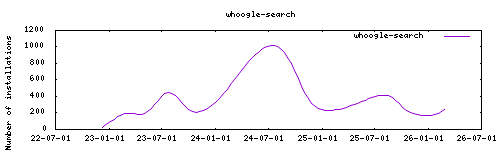
|
|
|
|
## About
|
|
|
|
[whoogle-search](https://github.com/benbusby/whoogle-search) is a Self-hosted, ad-free, privacy-respecting metasearch engine.
|
|
This addon is based on the docker image https://hub.docker.com/r/benbusby/whoogle-search/tags
|
|
|
|
## Configuration
|
|
|
|
Use the add-on `env_vars` option to pass extra environment variables (uppercase or lowercase names). See https://github.com/alexbelgium/hassio-addons/wiki/Add-Environment-variables-to-your-Addon-2 for details.
|
|
|
|
Webui can be found at <http://homeassistant:PORT> or through the sidebar using Ingress.
|
|
Configurations can be done through the app webUI, except for the following options.
|
|
|
|
### Options
|
|
|
|
| Option | Type | Default | Description |
|
|
|--------|------|---------|-------------|
|
|
| `TZ` | str | `Europe/Amsterdam` | Timezone |
|
|
| `WHOOGLE_CONFIG_LANGUAGE` | str | `lang_en` | Interface language |
|
|
| `WHOOGLE_CONFIG_URL` | str | | Base URL for the service |
|
|
| `WHOOGLE_CONFIG_THEME` | list | | Theme (system/light/dark) |
|
|
| `WHOOGLE_CONFIG_COUNTRY` | str | | Country code for search results |
|
|
| `WHOOGLE_CONFIG_SEARCH_LANGUAGE` | str | | Search language |
|
|
| `WHOOGLE_CONFIG_BLOCK` | str | | Comma-separated list of sites to block |
|
|
| `WHOOGLE_CONFIG_SAFE` | list | | Safe search (0/1) |
|
|
| `WHOOGLE_CONFIG_ALTS` | list | | Use alternative frontends (0/1) |
|
|
| `WHOOGLE_CONFIG_NEW_TAB` | list | | Open results in new tab (0/1) |
|
|
| `WHOOGLE_CONFIG_VIEW_IMAGE` | list | | Enable view image option (0/1) |
|
|
| `WHOOGLE_CONFIG_GET_ONLY` | list | | GET requests only (0/1) |
|
|
| `WHOOGLE_CONFIG_DISABLE` | list | | Disable changing settings (0/1) |
|
|
| `WHOOGLE_AUTOCOMPLETE` | list | | Enable autocomplete (0/1) |
|
|
| `WHOOGLE_MINIMAL` | list | | Minimal mode (0/1) |
|
|
| `WHOOGLE_CSP` | list | | Content Security Policy (0/1) |
|
|
| `WHOOGLE_RESULTS_PER_PAGE` | int | | Results per page (5-100) |
|
|
| `WHOOGLE_USER` | str | | Username for authentication |
|
|
| `WHOOGLE_PASS` | password | | Password for authentication |
|
|
| `WHOOGLE_PROXY_TYPE` | str | | Proxy type |
|
|
| `WHOOGLE_PROXY_LOC` | str | | Proxy location |
|
|
| `WHOOGLE_PROXY_USER` | str | | Proxy username |
|
|
| `WHOOGLE_PROXY_PASS` | str | | Proxy password |
|
|
| `WHOOGLE_ALT_TW` | str | | Twitter alternative frontend |
|
|
| `WHOOGLE_ALT_YT` | str | | YouTube alternative frontend |
|
|
| `WHOOGLE_ALT_IG` | str | | Instagram alternative frontend |
|
|
| `WHOOGLE_ALT_RD` | str | | Reddit alternative frontend |
|
|
| `WHOOGLE_ALT_MD` | str | | Medium alternative frontend |
|
|
| `WHOOGLE_ALT_TL` | str | | TikTok alternative frontend |
|
|
| `HTTPS_ONLY` | list | | HTTPS only mode (0/1) |
|
|
|
|
### Example Configuration
|
|
|
|
```yaml
|
|
TZ: "Europe/London"
|
|
WHOOGLE_CONFIG_LANGUAGE: "lang_en"
|
|
WHOOGLE_CONFIG_URL: "https://search.mydomain.com"
|
|
WHOOGLE_CONFIG_THEME: "dark"
|
|
WHOOGLE_CONFIG_COUNTRY: "US"
|
|
WHOOGLE_CONFIG_SAFE: "0"
|
|
WHOOGLE_AUTOCOMPLETE: "1"
|
|
WHOOGLE_USER: "admin"
|
|
WHOOGLE_PASS: "secure-password"
|
|
WHOOGLE_RESULTS_PER_PAGE: 20
|
|
```
|
|
|
|
For complete environment variable documentation, see: https://github.com/benbusby/whoogle-search#environment-variables
|
|
|
|
## Installation
|
|
|
|
The installation of this add-on is pretty straightforward and not different in comparison to installing any other add-on.
|
|
|
|
1. Add my add-ons repository to your home assistant instance (in supervisor addons store at top right, or click button below if you have configured my HA)
|
|
[](https://my.home-assistant.io/redirect/supervisor_add_addon_repository/?repository_url=https%3A%2F%2Fgithub.com%2Falexbelgium%2Fhassio-addons)
|
|
1. Install this add-on.
|
|
1. Click the `Save` button to store your configuration.
|
|
1. Set the add-on options to your preferences
|
|
1. Start the add-on.
|
|
1. Check the logs of the add-on to see if everything went well.
|
|
1. Open the webUI and adapt the software options
|
|
|
|
## Support
|
|
|
|
Create an issue on github
|
|
|
|
## Illustration
|
|
|
|

|
|
|
|
[repository]: https://github.com/alexbelgium/hassio-addons
|
|
|
|
|