mirror of
https://github.com/alexbelgium/hassio-addons.git
synced 2026-01-10 09:51:02 +01:00

163 lines
7.7 KiB
Markdown
163 lines
7.7 KiB
Markdown
# Home assistant add-on: Birdnet-Go
|
|
|
|
|
|
I maintain this and other Home Assistant add-ons in my free time: keeping up with upstream changes, HA changes, and testing on real hardware takes a lot of time (and some money). I use around 5-10 of my >110 addons so regularly I install test machines (and purchase some test services such as vpn) that I don't use myself to troubleshoot and improve the addons
|
|
|
|
If this add-on saves you time or makes your setup easier, I would be very grateful for your support!
|
|
|
|
[![Buy me a coffee][donation-badge]](https://www.buymeacoffee.com/alexbelgium)
|
|
[![Donate via PayPal][paypal-badge]](https://www.paypal.com/donate/?hosted_button_id=DZFULJZTP3UQA)
|
|
|
|
## Addon informations
|
|
|
|

|
|

|
|

|
|
|
|
[](https://www.codacy.com/gh/alexbelgium/hassio-addons/dashboard?utm_source=github.com&utm_medium=referral&utm_content=alexbelgium/hassio-addons&utm_campaign=Badge_Grade)
|
|
[](https://github.com/alexbelgium/hassio-addons/actions/workflows/weekly-supelinter.yaml)
|
|
[](https://github.com/alexbelgium/hassio-addons/actions/workflows/onpush_builder.yaml)
|
|
|
|
[donation-badge]: https://img.shields.io/badge/Buy%20me%20a%20coffee-%23d32f2f?logo=buy-me-a-coffee&style=flat&logoColor=white
|
|
[paypal-badge]: https://img.shields.io/badge/Donate%20via%20PayPal-0070BA?logo=paypal&style=flat&logoColor=white
|
|
|
|
_Thanks to everyone having starred my repo! To star it click on the image below, then it will be on top right. Thanks!_
|
|
|
|
[](https://github.com/alexbelgium/hassio-addons/stargazers)
|
|
|
|
|
|

|
|
|
|
## About
|
|
|
|
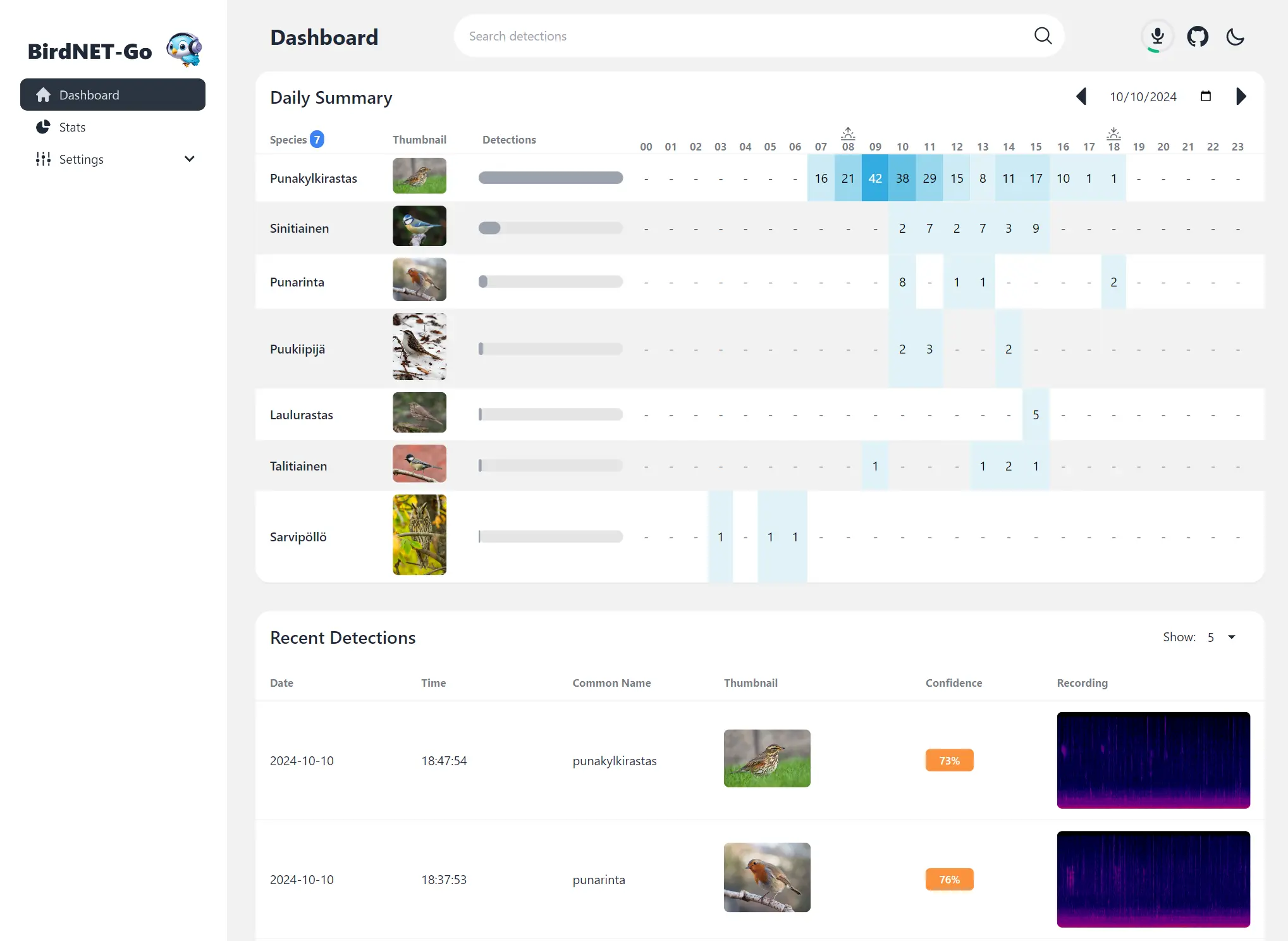
[BirdNET-Go](https://github.com/tphakala/birdnet-go/tree/main) is an AI solution for continuous avian monitoring and identification developed by @tphakala
|
|
|
|
This addon is based on their docker image.
|
|
|
|
## Configuration
|
|
|
|
Install, then start the addon a first time. Webui can be found at <http://homeassistant:8080>.
|
|
You'll need a microphone : either use one connected to HA or the audio stream of a rstp camera.
|
|
|
|
The audio clips folder can be stored on an external or SMB drive by mounting it from the addon options, then specifying the path instead of "clips/". For example, "/mnt/NAS/Birdnet/"
|
|
|
|
Options can be configured through three ways :
|
|
|
|
- Addon options
|
|
|
|
```yaml
|
|
ALSA_CARD : number of the card (0 or 1 usually), see https://github.com/tphakala/birdnet-go/blob/main/doc/installation.md#deciding-alsa_card-value
|
|
TZ: Etc/UTC specify a timezone to use, see https://en.wikipedia.org/wiki/List_of_tz_database_time_zones#List
|
|
COMMAND : realtime --rtsp url # allows to provide arguments to birdnet-go
|
|
```
|
|
|
|
- Config.yaml
|
|
Additional variables can be configured using the config.yaml file found in /config/db21ed7f_birdnet-go/config.yaml using the Filebrowser addon
|
|
|
|
- Config_env.yaml
|
|
Additional environment variables can be configured there
|
|
|
|
### Mounting Drives
|
|
|
|
This addon supports mounting both local drives and remote SMB shares:
|
|
|
|
- **Local drives**: See [Mounting Local Drives in Addons](https://github.com/alexbelgium/hassio-addons/wiki/Mounting-Local-Drives-in-Addons)
|
|
- **Remote shares**: See [Mounting Remote Shares in Addons](https://github.com/alexbelgium/hassio-addons/wiki/Mounting-remote-shares-in-Addons)
|
|
|
|
### Custom Scripts and Environment Variables
|
|
|
|
This addon supports custom scripts and environment variables through the `addon_config` mapping:
|
|
|
|
- **Custom scripts**: See [Running Custom Scripts in Addons](https://github.com/alexbelgium/hassio-addons/wiki/Running-custom-scripts-in-Addons)
|
|
- **env_vars option**: Use the add-on `env_vars` option to pass extra environment variables (uppercase or lowercase names). See https://github.com/alexbelgium/hassio-addons/wiki/Add-Environment-variables-to-your-Addon-2 for details.
|
|
|
|
## Installation
|
|
|
|
The installation of this add-on is pretty straightforward and not different in comparison to installing any other add-on.
|
|
|
|
1. Add my add-ons repository to your home assistant instance (in supervisor addons store at top right, or click button below if you have configured my HA)
|
|
|
|
[](https://my.home-assistant.io/redirect/supervisor_add_addon_repository/?repository_url=https%3A%2F%2Fgithub.com%2Falexbelgium%2Fhassio-addons)
|
|
1. Install this add-on.
|
|
1. Click the `Save` button to store your configuration.
|
|
1. Set the add-on options to your preferences
|
|
1. Start the add-on.
|
|
1. Check the logs of the add-on to see if everything went well.
|
|
1. Open the webUI and adapt the software options
|
|
|
|
## Integration with HA
|
|
|
|
Home Assistant Integration instructions are found here, [Birdnet-Go Addon: Home Assistant Integration](./HAINTEGRATION.md)
|
|
|
|
## Setting up a RTSP Source using VLC
|
|
|
|
VLC opens a TCP port but the stream is udp. Because of this will need to configure Birdnet-Go to use udp. Adjust the config.yaml file to udp or use the birdnet-go command line option:
|
|
|
|
`--rtsptransport udp --rtsp rtsp://192.168.1.21:8080/stream.sdp`
|
|
|
|
### Linux instructions
|
|
|
|
Run vlc without an interface using one of these commands:
|
|
|
|
```bash
|
|
# This should work for most devices
|
|
/usr/bin/vlc -I dummy -vvv alsa://hw:0,0 --no-sout-all --sout-keep --sout '#transcode{acodec=mpga}:rtp{sdp=rtsp://:8080/stream.sdp}'
|
|
|
|
# Try this if the first command does not work
|
|
/usr/bin/vlc -I dummy -vvv alsa://hw:4,0 --no-sout-all --sout-keep --sout '#rtp{sdp=rtsp://:8080/stream.sdp}'
|
|
```
|
|
|
|
Run `arecord -l` to get microphone hardware info
|
|
|
|
```text
|
|
**** List of CAPTURE Hardware Devices ****
|
|
card 0: PCH [HDA Intel PCH], device 0: ALC3220 Analog [ALC3220 Analog]
|
|
Subdevices: 1/1
|
|
Subdevice #0: subdevice #0
|
|
card 2: S7 [SteelSeries Arctis 7], device 0: USB Audio [USB Audio]
|
|
Subdevices: 1/1
|
|
Subdevice #0: subdevice #0
|
|
card 3: Nano [Yeti Nano], device 0: USB Audio [USB Audio]
|
|
Subdevices: 1/1
|
|
Subdevice #0: subdevice #0
|
|
card 4: Device [USB PnP Sound Device], device 0: USB Audio [USB Audio]
|
|
Subdevices: 0/1
|
|
Subdevice #0: subdevice #0
|
|
```
|
|
|
|
hw:4,0 = **card 4**: Device [USB PnP Sound Device], **device 0**: USB Audio [USB Audio]
|
|
|
|
Systemd service file example. Adjust the user:group accordingly. If you want to run as root, you will likely need to run vlc-wrapper instead of vlc.
|
|
|
|
```text
|
|
[Unit]
|
|
Description=VLC Birdnet RTSP Server
|
|
Wants=network-online.target
|
|
After=network-online.target
|
|
|
|
[Service]
|
|
Type=simple
|
|
StandardOutput=journal
|
|
ExecStart=/usr/bin/vlc -I dummy -vvv alsa://hw:0,0 --sout '#transcode{acodec=mpga}:rtp{sdp=rtsp://:8080/stream.sdp}'
|
|
User=someone
|
|
Group=somegroup
|
|
|
|
[Install]
|
|
WantedBy=multi-user.target
|
|
```
|
|
|
|
## Common issues
|
|
|
|
Not yet available
|
|
|
|
## Support
|
|
|
|
Create an issue on github
|
|
|
|
---
|
|
|
|
|
|
|
|
|
|
|