mirror of
https://github.com/alexbelgium/hassio-addons.git
synced 2026-01-11 18:31:02 +01:00

91 lines
4.4 KiB
Markdown
91 lines
4.4 KiB
Markdown
# Home assistant add-on: readarr
|
|
|
|
[![Donate][donation-badge]](https://www.buymeacoffee.com/alexbelgium)
|
|
|
|

|
|

|
|

|
|
|
|
[](https://www.codacy.com/gh/alexbelgium/hassio-addons/dashboard?utm_source=github.com&utm_medium=referral&utm_content=alexbelgium/hassio-addons&utm_campaign=Badge_Grade)
|
|
[](https://github.com/alexbelgium/hassio-addons/actions/workflows/weekly-supelinter.yaml)
|
|
[](https://github.com/alexbelgium/hassio-addons/actions/workflows/onpush_builder.yaml)
|
|
|
|
[donation-badge]: https://img.shields.io/badge/Buy%20me%20a%20coffee-%23d32f2f?logo=buy-me-a-coffee&style=flat&logoColor=white
|
|
|
|
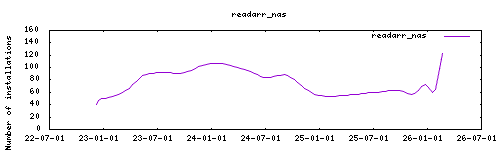
_Thanks to everyone having starred my repo! To star it click on the image below, then it will be on top right. Thanks!_
|
|
|
|
[](https://github.com/alexbelgium/hassio-addons/stargazers)
|
|
|
|
|
|
|
|
## About
|
|
|
|
---
|
|
|
|
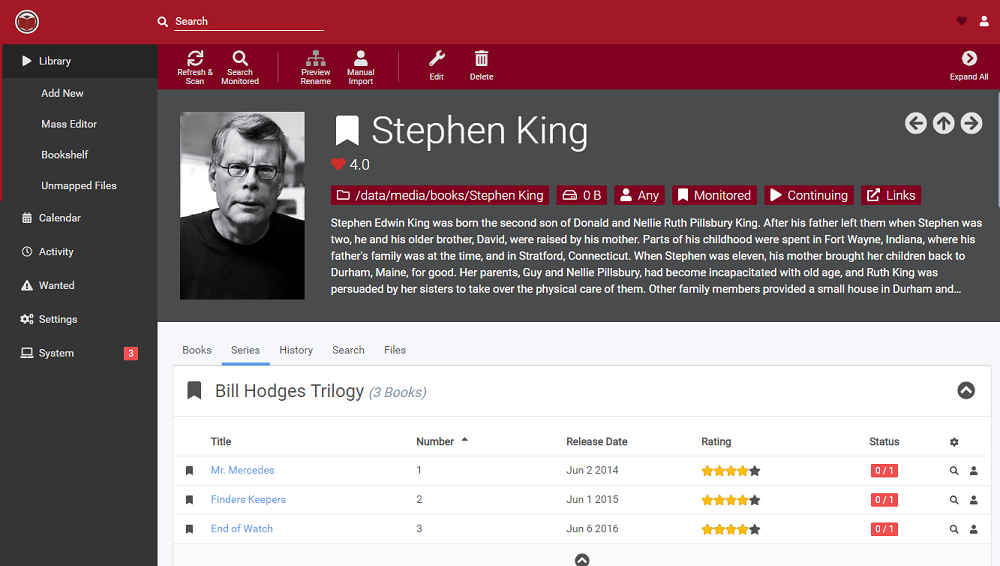
[Readarr](https://github.com/Readarr/Readarr) is a ebook collection manager for Usenet and BitTorrent users. It can monitor multiple RSS feeds for new books from your favorite authors and will interface with clients and indexers to grab, sort, and rename them.is book Manager and Automation (Sonarr for Ebooks).
|
|
This addon is based on the docker image https://github.com/linuxserver/docker-readarr
|
|
|
|
## Installation
|
|
|
|
---
|
|
|
|
The installation of this add-on is pretty straightforward and not different in comparison to installing any other add-on.
|
|
|
|
1. Add my add-ons repository to your home assistant instance (in supervisor addons store at top right, or click button below if you have configured my HA)
|
|
[](https://my.home-assistant.io/redirect/supervisor_add_addon_repository/?repository_url=https%3A%2F%2Fgithub.com%2Falexbelgium%2Fhassio-addons)
|
|
1. Install this add-on.
|
|
1. Click the `Save` button to store your configuration.
|
|
1. Set the add-on options to your preferences
|
|
1. Start the add-on.
|
|
1. Check the logs of the add-on to see if everything went well.
|
|
1. Open the webUI and adapt the software options
|
|
|
|
## Usage
|
|
|
|
Webui can be found at <http://homeassistant:8787/readarr> or with ingress ☝️ by clicking the `Open Web UI` button.
|
|
|
|
|
|
The default username/password : described in the startup log.
|
|
|
|
## Configuration
|
|
|
|
Options can be configured through three ways :
|
|
|
|
### Addon options
|
|
|
|
```yaml
|
|
PGID: user
|
|
GPID: user
|
|
TZ: timezone
|
|
localdisks: sda1 #put the hardware name of your drive to mount separated by commas, or its label. ex. sda1, sdb1, MYNAS...
|
|
networkdisks: "//SERVER/SHARE" # optional, list of smb servers to mount, separated by commas
|
|
cifsusername: "username" # optional, smb username, same for all smb shares
|
|
cifspassword: "password" # optional, smb password
|
|
```
|
|
|
|
### Within readarr itself
|
|
|
|
All normal configuration from within the app
|
|
|
|
### The ENV override file: `/config/addons_config/readarr_nas.yml`
|
|
|
|
For more control, you can add enviroment variables by defining them as keys in a valid `.yaml` file.
|
|
|
|
```yaml
|
|
TZ: Europe/Paris
|
|
```
|
|
|
|
more info : https://github.com/alexbelgium/hassio-addons/wiki/Add%E2%80%90ons-feature-:-add-env-variables
|
|
|
|
## Support
|
|
|
|
Create an issue on github
|
|
|
|
## Illustration
|
|
|
|
---
|
|
|
|
|
|
|
|
[repository]: https://github.com/alexbelgium/hassio-addons
|