mirror of
https://github.com/alexbelgium/hassio-addons.git
synced 2026-01-11 02:11:01 +01:00

55 lines
3.4 KiB
Markdown
55 lines
3.4 KiB
Markdown
## ⚠ Open Request : [✨ [REQUEST] sponsorblockcast (opened 2023-03-14)](https://github.com/alexbelgium/hassio-addons/issues/756) by [@ankushg](https://github.com/ankushg)
|
|
|
|
# Home assistant add-on: Sponsorblockcast
|
|
|
|
[![Donate][donation-badge]](https://www.buymeacoffee.com/alexbelgium)
|
|
|
|

|
|

|
|

|
|
|
|
[](https://www.codacy.com/gh/alexbelgium/hassio-addons/dashboard?utm_source=github.com&utm_medium=referral&utm_content=alexbelgium/hassio-addons&utm_campaign=Badge_Grade)
|
|
[](https://github.com/marketplace/actions/super-linter)
|
|
[](https://github.com/alexbelgium/hassio-addons/actions/workflows/builder.yaml)
|
|
|
|
[donation-badge]: https://img.shields.io/badge/Buy%20me%20a%20coffee-%23d32f2f?logo=buy-me-a-coffee&style=flat&logoColor=white
|
|
|
|
_Thanks to everyone having starred my repo! To star it click on the image below, then it will be on top right. Thanks!_
|
|
|
|
[](https://github.com/alexbelgium/hassio-addons/stargazers)
|
|
|
|
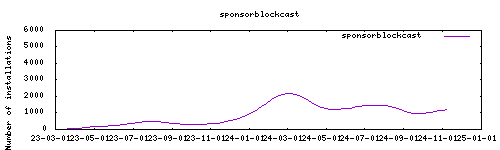
|
|
|
|
## About
|
|
|
|
Sponsorblockcast is a POSIX shell script that skips sponsored YouTube content and skippable ads on all local Chromecasts, using the SponsorBlock API. It was inspired by CastBlock but written from scratch to avoid some of its pitfalls (see Differences from CastBlock).
|
|
|
|
This app is developed by @nichobi here : https://github.com/nichobi/sponsorblockcast
|
|
|
|
Feedback from @diamant-x :
|
|
> Special attention that it only works when casting to a chromecast a youtube video. It mostly removes manual interaction, can't magically skip ads when they are forced to be viewed.
|
|
> Also, it doesn't seem to work when playing on an android tv through native youtube app, which would be a great addition, or on a smartphone.
|
|
|
|
## Configuration
|
|
|
|
See https://github.com/nichobi/sponsorblockcast
|
|
|
|
## Installation
|
|
|
|
The installation of this add-on is pretty straightforward and not different in
|
|
comparison to installing any other Hass.io add-on.
|
|
|
|
1. [Add my Hass.io add-ons repository][repository] to your Hass.io instance.
|
|
1. Install this add-on.
|
|
1. Click the `Save` button to store your configuration.
|
|
1. Start the add-on.
|
|
1. Check the logs of the add-on to see if everything went well.
|
|
1. Carefully configure the add-on to your preferences, see the official documentation for for that.
|
|
|
|
## Support and issues
|
|
|
|
Addon : here
|
|
App : https://github.com/nichobi/sponsorblockcast
|
|
|
|
[repository]: https://github.com/alexbelgium/hassio-addons
|