mirror of
https://github.com/alexbelgium/hassio-addons.git
synced 2026-03-04 16:21:35 +01:00
 8a0f15413c
Add the "Add repository to my Home Assistant" blue button to all
addon README files that were missing it. This makes it easier for
new HA users to add the repository with a single click.

Updated 59 addon READMEs:
- 51 with standard Installation section format
- 8 with non-standard or missing Installation sections

Co-authored-by: alexbelgium <44178713+alexbelgium@users.noreply.github.com>
76 lines
5.7 KiB
Markdown
76 lines
5.7 KiB
Markdown
# Home assistant add-on: NetAlertX
|
|
|
|
|
|
I maintain this and other Home Assistant add-ons in my free time: keeping up with upstream changes, HA changes, and testing on real hardware takes a lot of time (and some money). I use around 5-10 of my >110 addons so regularly I install test machines (and purchase some test services such as vpn) that I don't use myself to troubleshoot and improve the addons
|
|
|
|
If this add-on saves you time or makes your setup easier, I would be very grateful for your support!
|
|
|
|
[![Buy me a coffee][donation-badge]](https://www.buymeacoffee.com/alexbelgium)
|
|
[![Donate via PayPal][paypal-badge]](https://www.paypal.com/donate/?hosted_button_id=DZFULJZTP3UQA)
|
|
|
|
## Addon informations
|
|
|
|

|
|

|
|

|
|

|
|
|
|
[](https://www.codacy.com/gh/alexbelgium/hassio-addons/dashboard?utm_source=github.com&utm_medium=referral&utm_content=alexbelgium/hassio-addons&utm_campaign=Badge_Grade)
|
|
[](https://github.com/alexbelgium/hassio-addons/actions/workflows/weekly-supelinter.yaml)
|
|
[](https://github.com/alexbelgium/hassio-addons/actions/workflows/onpush_builder.yaml)
|
|
|
|
[donation-badge]: https://img.shields.io/badge/Buy%20me%20a%20coffee-%23d32f2f?logo=buy-me-a-coffee&style=flat&logoColor=white
|
|
[paypal-badge]: https://img.shields.io/badge/Donate%20via%20PayPal-0070BA?logo=paypal&style=flat&logoColor=white
|
|
|
|
_Thanks to everyone having starred my repo! To star it click on the image below, then it will be on top right. Thanks!_
|
|
|
|
[](https://github.com/alexbelgium/hassio-addons/stargazers)
|
|
|
|
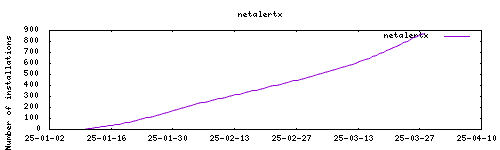
|
|
|
|
## About
|
|
|
|
Network presence and intruder detector. Scans for devices connected to your network and alerts you if new and unknown devices are found.
|
|
This addon is based on the [docker image](https://github.com/jokob-sk/NetAlertX/tree/main/dockerfiles) from jokob-sk.
|
|
|
|
## Installation
|
|
|
|
The installation of this add-on is pretty straightforward and not different in
|
|
comparison to installing any other Hass.io add-on.
|
|
|
|
1. Add my add-ons repository to your home assistant instance (in supervisor addons store at top right, or click button below if you have configured my HA)
|
|
[](https://my.home-assistant.io/redirect/supervisor_add_addon_repository/?repository_url=https%3A%2F%2Fgithub.com%2Falexbelgium%2Fhassio-addons)
|
|
1. Install this add-on.
|
|
1. Click the `Save` button to store your configuration.
|
|
1. Start the add-on.
|
|
1. Check the logs of the add-on to see if everything went well.
|
|
1. Carefully configure the add-on to your preferences, see the official documentation for that.
|
|
|
|
## Configuration
|
|
|
|
1. If unavailable, the app generates a default `app.conf` and `app.db` file on the first run.
|
|
1. The preferred way is to manage the configuration via the Settings section in the UI, if UI is inaccessible you can modify `app.conf` in the `/config/config/` folder directly.
|
|
1. You have to specify which network(s) should be scanned. This is done by entering subnets that are accessible from the host. If you use the default `ARPSCAN` plugin, you have to specify at least one valid subnet and interface in the `SCAN_SUBNETS` setting. See the [documentation on How to set up multiple SUBNETS, VLANs and what are limitations](https://github.com/jokob-sk/NetAlertX/blob/main/docs/SUBNETS.md) and for troubleshooting and more advanced scenarios.
|
|
1. Read how to get devices into your [Home Assistant instance via the MQTT plugin](https://github.com/jokob-sk/NetAlertX/blob/main/docs/HOME_ASSISTANT.md)
|
|
1. Back everything up by following the [Backups documentation](https://github.com/jokob-sk/NetAlertX/blob/main/docs/BACKUPS.md).
|
|
|
|
Webui can be found at <http://homeassistant.local:20211> or using HA ingress
|
|
|
|
<img width="500" alt="image" src="https://github.com/user-attachments/assets/fd74af43-091a-4f38-9879-037ca64cfab9" />
|
|
|
|
```yaml
|
|
PGID: user
|
|
GPID: user
|
|
```
|
|
|
|
### Custom Scripts and Environment Variables
|
|
|
|
This addon supports custom scripts and environment variables through the `addon_config` mapping:
|
|
|
|
- **Custom scripts**: See [Running Custom Scripts in Addons](https://github.com/alexbelgium/hassio-addons/wiki/Running-custom-scripts-in-Addons)
|
|
- **env_vars option**: Use the add-on `env_vars` option to pass extra environment variables (uppercase or lowercase names). See https://github.com/alexbelgium/hassio-addons/wiki/Add-Environment-variables-to-your-Addon-2 for details.
|
|
|
|
[repository]: https://github.com/alexbelgium/hassio-addons
|
|
|
|
|