mirror of
https://github.com/alexbelgium/hassio-addons.git
synced 2026-02-03 10:27:43 +01:00

86 lines
4.9 KiB
Markdown
86 lines
4.9 KiB
Markdown
# Home assistant add-on: Tdarr
|
|
|
|
[![Donate][donation-badge]](https://www.buymeacoffee.com/alexbelgium)
|
|
[![Donate][paypal-badge]](https://www.paypal.com/donate/?hosted_button_id=DZFULJZTP3UQA)
|
|
|
|

|
|

|
|

|
|
|
|
[](https://www.codacy.com/gh/alexbelgium/hassio-addons/dashboard?utm_source=github.com&utm_medium=referral&utm_content=alexbelgium/hassio-addons&utm_campaign=Badge_Grade)
|
|
[](https://github.com/alexbelgium/hassio-addons/actions/workflows/weekly-supelinter.yaml)
|
|
[](https://github.com/alexbelgium/hassio-addons/actions/workflows/onpush_builder.yaml)
|
|
|
|
[donation-badge]: https://img.shields.io/badge/Buy%20me%20a%20coffee%20(no%20paypal)-%23d32f2f?logo=buy-me-a-coffee&style=flat&logoColor=white
|
|
[paypal-badge]: https://img.shields.io/badge/Buy%20me%20a%20coffee%20with%20Paypal-0070BA?logo=paypal&style=flat&logoColor=white
|
|
|
|
_Thanks to everyone having starred my repo! To star it click on the image below, then it will be on top right. Thanks!_
|
|
|
|
[](https://github.com/alexbelgium/hassio-addons/stargazers)
|
|
|
|
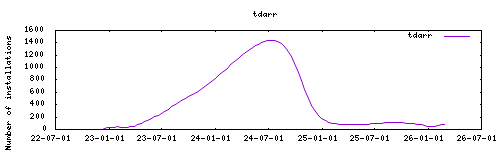
|
|
|
|
## About
|
|
|
|
[Tdarr](https://tdarr.io) is a closed-source distributed transcoding system for automating media library transcode/remux management and making sure your files are exactly how you need them to be in terms of codecs/streams/containers and so on. Put your spare hardware to use with Tdarr Nodes for Windows, Linux (including Linux arm) and macOS.
|
|
|
|
This addon is based on the [docker image](https://hub.docker.com/r/hurlenko/Tdarr) from hurlenko.
|
|
|
|
## Configuration
|
|
|
|
Webui can be found at <http://homeassistant:8265> or through the sidebar using Ingress.
|
|
App documentation can be found here: https://docs.tdarr.io/docs/welcome/what/
|
|
Configurations can be done through the app webUI, except for the following options.
|
|
|
|
### Options
|
|
|
|
| Option | Type | Default | Description |
|
|
|--------|------|---------|-------------|
|
|
| `CONFIG_LOCATION` | str | `/config/addons_config/tdarr` | Path where Tdarr config is stored |
|
|
| `TZ` | str | | Timezone (e.g., `Europe/London`) |
|
|
| `localdisks` | str | | Local drives to mount (e.g., `sda1,sdb1,MYNAS`) |
|
|
| `networkdisks` | str | | SMB shares to mount (e.g., `//SERVER/SHARE`) |
|
|
| `cifsusername` | str | | SMB username for network shares |
|
|
| `cifspassword` | str | | SMB password for network shares |
|
|
| `cifsdomain` | str | | SMB domain for network shares |
|
|
|
|
### Example Configuration
|
|
|
|
```yaml
|
|
CONFIG_LOCATION: "/config/addons_config/tdarr"
|
|
TZ: "Europe/London"
|
|
localdisks: "sda1,sdb1"
|
|
networkdisks: "//192.168.1.100/media,//nas.local/transcoding"
|
|
cifsusername: "mediauser"
|
|
cifspassword: "password123"
|
|
cifsdomain: "workgroup"
|
|
```
|
|
|
|
### Mounting Drives
|
|
|
|
This addon supports mounting both local drives and remote SMB shares:
|
|
|
|
- **Local drives**: See [Mounting Local Drives in Addons](https://github.com/alexbelgium/hassio-addons/wiki/Mounting-Local-Drives-in-Addons)
|
|
- **Remote shares**: See [Mounting Remote Shares in Addons](https://github.com/alexbelgium/hassio-addons/wiki/Mounting-remote-shares-in-Addons)
|
|
|
|
## Installation
|
|
|
|
The installation of this add-on is pretty straightforward and not different in
|
|
comparison to installing any other Hass.io add-on.
|
|
|
|
1. [Add my Hass.io add-ons repository][repository] to your Hass.io instance.
|
|
1. Install this add-on.
|
|
1. Click the `Save` button to store your configuration.
|
|
1. Start the add-on.
|
|
1. Check the logs of the add-on to see if everything went well.
|
|
1. Carefully configure the add-on to your preferences, see the official documentation for for that.
|
|
|
|
## Support
|
|
|
|
Create an issue on github, or ask on the [home assistant thread](https://community.home-assistant.io/t/home-assistant-addon-Tdarr/282108/3)
|
|
|
|
[repository]: https://github.com/alexbelgium/hassio-addons
|
|
[aarch64-shield]: https://img.shields.io/badge/aarch64-yes-green.svg
|
|
[amd64-shield]: https://img.shields.io/badge/amd64-yes-green.svg
|
|
[armv7-shield]: https://img.shields.io/badge/armv7-yes-green.svg
|