mirror of
https://github.com/alexbelgium/hassio-addons.git
synced 2026-01-11 10:21:02 +01:00

108 lines
5.5 KiB
Markdown
108 lines
5.5 KiB
Markdown
# Hass.io Add-ons: Tor with bridges
|
|
|
|
[![Donate][donation-badge]](https://www.buymeacoffee.com/alexbelgium)
|
|
[![Donate][paypal-badge]](https://www.paypal.com/donate/?hosted_button_id=DZFULJZTP3UQA)
|
|
|
|

|
|

|
|

|
|
|
|
[](https://www.codacy.com/gh/alexbelgium/hassio-addons/dashboard?utm_source=github.com&utm_medium=referral&utm_content=alexbelgium/hassio-addons&utm_campaign=Badge_Grade)
|
|
[](https://github.com/alexbelgium/hassio-addons/actions/workflows/weekly-supelinter.yaml)
|
|
[](https://github.com/alexbelgium/hassio-addons/actions/workflows/onpush_builder.yaml)
|
|
|
|
[donation-badge]: https://img.shields.io/badge/Buy%20me%20a%20coffee%20(no%20paypal)-%23d32f2f?logo=buy-me-a-coffee&style=flat&logoColor=white
|
|
[paypal-badge]: https://img.shields.io/badge/Buy%20me%20a%20coffee%20with%20Paypal-0070BA?logo=paypal&style=flat&logoColor=white
|
|
|
|
_Thanks to everyone having starred my repo! To star it click on the image below, then it will be on top right. Thanks!_
|
|
|
|
[](https://github.com/alexbelgium/hassio-addons/stargazers)
|
|
|
|
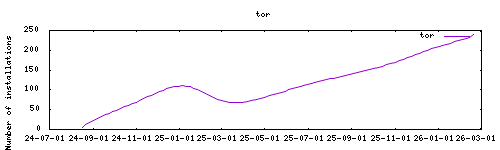
|
|
|
|
## About
|
|
|
|
Extended version of the [Tor addon from Home Assistant Community repository](https://github.com/hassio-addons/addon-tor) by supporting multiples bridges protocols WebTunnel, Snowflake and OBFS.
|
|
|
|
## Installation
|
|
|
|
The installation of this add-on is pretty straightforward and not different in comparison to installing any other add-on.
|
|
|
|
1. Add my add-ons repository to your home assistant instance (in supervisor addons store at top right, or click button below if you have configured my HA)
|
|
[](https://my.home-assistant.io/redirect/supervisor_add_addon_repository/?repository_url=https%3A%2F%2Fgithub.com%2Falexbelgium%2Fhassio-addons)
|
|
1. Install this add-on.
|
|
1. Click the `Save` button to store your configuration.
|
|
1. Set the add-on options to your preferences
|
|
1. Start the add-on.
|
|
1. Check the logs of the add-on to see if everything went well.
|
|
1. Open the webUI and adapt the software options
|
|
|
|
## Configuration
|
|
|
|
You should follow to the initial guide for configuring base addon options. Here will described only extra options in comparisons with base:
|
|
|
|
### Option: `bridges`
|
|
|
|
> Ensure the option value is clear to avoid unintended use of transport plugins and bridges.
|
|
|
|
Bridges are Tor relays that help you circumvent censorship.
|
|
Access to bridges is provided by supported transport plugins:
|
|
|
|
#### OBFS
|
|
|
|
Because bridge addresses are not public, you will need to request them yourself. You have a few options:
|
|
|
|
- Visit [Tor][tor-bridges-obfs4] project and follow the instructions, or
|
|
- Email `bridges@torproject.org` from a Gmail, or Riseup email address
|
|
- Send a message to @GetBridgesBot on Telegram. Tap on 'Start' or write /start or /bridges in the chat.
|
|
|
|
For example:
|
|
|
|
```yaml
|
|
bridges:
|
|
- >-
|
|
obfs4 123.45.67.89:443 EFC6A00EE6272355C023862378AC77F935F091E4
|
|
cert=KkdWiWlfetJG9SFrzX8g1teBbgxtsc0zPiN5VLxqNNH+iudVW48CoH/XVXPQntbivXIqZA
|
|
iat-mode=0
|
|
```
|
|
|
|
#### Webtunnel
|
|
|
|
Visit [Tor][tor-bridges-webtunnel] project and follow the instructions
|
|
|
|
For example:
|
|
|
|
```yaml
|
|
bridges:
|
|
- >-
|
|
webtunnel 192.0.2.3:1
|
|
DEADBEEFDEADBEEFDEADBEEFDEADBEEFDEADBEEF
|
|
url=https://akbwadp9lc5fyyz0cj4d76z643pxgbfh6oyc-167-71-71-157.sslip.io/5m9yq0j4ghkz0fz7qmuw58cvbjon0ebnrsp0
|
|
ver=0.0.1
|
|
```
|
|
|
|
#### Snowflake
|
|
|
|
What is [snowflake][what-is-snowflake], example:
|
|
|
|
```yaml
|
|
bridges:
|
|
- >-
|
|
snowflake 192.0.2.3:80 2B280B23E1107BB62ABFC40DDCC8824814F80A72
|
|
fingerprint=2B280B23E1107BB62ABFC40DDCC8824814F80A72
|
|
url=https://snowflake-broker.torproject.net/
|
|
ampcache=https://cdn.ampproject.org/
|
|
front=www.google.com
|
|
ice=stun:stun.l.google.com:19302,stun:stun.antisip.com:3478,stun:stun.bluesip.net:3478,stun:stun.dus.net:3478,stun:stun.epygi.com:3478,stun:stun.sonetel.com:3478,stun:stun.uls.co.za:3478,stun:stun.voipgate.com:3478,stun:stun.voys.nl:3478
|
|
utls-imitate=hellorandomizedalpn
|
|
```
|
|
|
|
## Support
|
|
|
|
If you have in issue with your installation, please be sure to checkout github.
|
|
|
|
[tor-hidden-service]: https://www.torproject.org/docs/hidden-services.html.en
|
|
[tor-bridges-obfs4]: https://bridges.torproject.org/bridges/?transport=obfs4
|
|
[tor-bridges-webtunnel]: https://bridges.torproject.org/bridges/?transport=webtunnel
|
|
[what-is-snowflake]: https://support.torproject.org/censorship/what-is-snowflake/
|