mirror of
https://github.com/alexbelgium/hassio-addons.git
synced 2026-01-11 02:11:01 +01:00

90 lines
5.3 KiB
Markdown
90 lines
5.3 KiB
Markdown
# Home assistant add-on: Guacamole
|
|
|
|
[![Donate][donation-badge]](https://www.buymeacoffee.com/alexbelgium)
|
|
[![Donate][paypal-badge]](https://www.paypal.com/donate/?hosted_button_id=DZFULJZTP3UQA)
|
|
|
|

|
|

|
|

|
|
|
|
[](https://www.codacy.com/gh/alexbelgium/hassio-addons/dashboard?utm_source=github.com&utm_medium=referral&utm_content=alexbelgium/hassio-addons&utm_campaign=Badge_Grade)
|
|
[](https://github.com/alexbelgium/hassio-addons/actions/workflows/weekly-supelinter.yaml)
|
|
[](https://github.com/alexbelgium/hassio-addons/actions/workflows/onpush_builder.yaml)
|
|
|
|
[donation-badge]: https://img.shields.io/badge/Buy%20me%20a%20coffee%20(no%20paypal)-%23d32f2f?logo=buy-me-a-coffee&style=flat&logoColor=white
|
|
[paypal-badge]: https://img.shields.io/badge/Buy%20me%20a%20coffee%20with%20Paypal-0070BA?logo=paypal&style=flat&logoColor=white
|
|
|
|
_Thanks to everyone having starred my repo! To star it click on the image below, then it will be on top right. Thanks!_
|
|
|
|
[](https://github.com/alexbelgium/hassio-addons/stargazers)
|
|
|
|
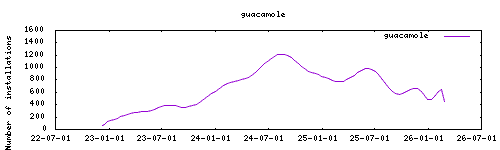
|
|
|
|
## About
|
|
|
|
[Apache Guacamole](https://guacamole.apache.org/) is a clientless remote desktop gateway that supports standard protocols like VNC, RDP, and SSH. It provides a web-based interface for accessing remote systems without requiring any client software on the user's device. Guacamole acts as a proxy, translating between the web-based frontend and the actual remote desktop protocols.
|
|
|
|
This addon combines both the Guacamole server (guacd) and web application components with an integrated PostgreSQL database for storing connection configurations and user management. The solution provides a complete remote desktop gateway that can be used to securely access computers and servers from anywhere via a web browser.
|
|
|
|
This addon is based on the docker image from: https://github.com/abesnier/docker-guacamole
|
|
|
|
## Configuration
|
|
|
|
Webui can be found at `<your-ip>:8080` or through the sidebar using Ingress.
|
|
|
|
The default username is `guacadmin` with password `guacadmin`. It is strongly recommended to change this password immediately after first login.
|
|
|
|
### Options
|
|
|
|
| Option | Type | Default | Description |
|
|
|--------|------|---------|-------------|
|
|
| `EXTENSIONS` | str | `auth-totp` | Guacamole extensions to enable (e.g., `auth-totp`) |
|
|
| `TZ` | str | | Timezone (e.g., `Europe/London`) |
|
|
|
|
### Example Configuration
|
|
|
|
```yaml
|
|
EXTENSIONS: "auth-totp"
|
|
TZ: "Europe/London"
|
|
```
|
|
|
|
### Database Setup
|
|
|
|
The addon automatically configures a PostgreSQL database for storing Guacamole configurations, users, and connections. The database files are stored in `/config/postgres` and are automatically created on first startup.
|
|
|
|
### Custom Scripts and Environment Variables
|
|
|
|
This addon supports custom scripts and environment variables through the `addon_config` mapping:
|
|
|
|
- **Custom scripts**: See [Running Custom Scripts in Addons](https://github.com/alexbelgium/hassio-addons/wiki/Running-custom-scripts-in-Addons)
|
|
- **Environment variables**: See [Add Environment Variables to your Addon](https://github.com/alexbelgium/hassio-addons/wiki/Add-Environment-variables-to-your-Addon)
|
|
|
|
## Installation
|
|
|
|
The installation of this add-on is pretty straightforward and not different in
|
|
comparison to installing any other Hass.io add-on.
|
|
|
|
1. [Add my Hass.io add-ons repository][repository] to your Hass.io instance.
|
|
1. Install this add-on.
|
|
1. Click the `Save` button to store your configuration.
|
|
1. Start the add-on.
|
|
1. Check the logs of the add-on to see if everything went well.
|
|
1. Go to the web interface and log in with the default credentials (`guacadmin`/`guacadmin`).
|
|
1. Change the default password immediately for security.
|
|
1. Configure your remote connections through the Guacamole web interface.
|
|
|
|
## Setup
|
|
|
|
After installation and first login:
|
|
|
|
1. **Change Default Password**: Go to Settings → Users → guacadmin and change the password
|
|
2. **Create Connections**: Use the web interface to add RDP, VNC, or SSH connections to your remote systems
|
|
3. **Configure Extensions**: If using TOTP authentication, configure it in the user settings
|
|
4. **User Management**: Create additional users and assign connection permissions as needed
|
|
|
|
## Support
|
|
|
|
Create an issue on [GitHub][repository]
|
|
|
|
[repository]: https://github.com/alexbelgium/hassio-addons
|