mirror of
https://github.com/alexbelgium/hassio-addons.git
synced 2026-01-10 09:51:02 +01:00

151 lines
7.3 KiB
Markdown
151 lines
7.3 KiB
Markdown
# Home assistant add-on: Photoprism
|
|
|
|
|
|
I maintain this and other Home Assistant add-ons in my free time: keeping up with upstream changes, HA changes, and testing on real hardware takes a lot of time (and some money). I use around 5-10 of my >110 addons so regularly I install test machines (and purchase some test services such as vpn) that I don't use myself to troubleshoot and improve the addons
|
|
|
|
If this add-on saves you time or makes your setup easier, I would be very grateful for your support!
|
|
|
|
[![Buy me a coffee][donation-badge]](https://www.buymeacoffee.com/alexbelgium)
|
|
[![Donate via PayPal][paypal-badge]](https://www.paypal.com/donate/?hosted_button_id=DZFULJZTP3UQA)
|
|
|
|
## Addon informations
|
|
|
|

|
|

|
|

|
|
|
|
[](https://www.codacy.com/gh/alexbelgium/hassio-addons/dashboard?utm_source=github.com&utm_medium=referral&utm_content=alexbelgium/hassio-addons&utm_campaign=Badge_Grade)
|
|
[](https://github.com/alexbelgium/hassio-addons/actions/workflows/weekly-supelinter.yaml)
|
|
[](https://github.com/alexbelgium/hassio-addons/actions/workflows/onpush_builder.yaml)
|
|
|
|
[donation-badge]: https://img.shields.io/badge/Buy%20me%20a%20coffee-%23d32f2f?logo=buy-me-a-coffee&style=flat&logoColor=white
|
|
[paypal-badge]: https://img.shields.io/badge/Donate%20via%20PayPal-0070BA?logo=paypal&style=flat&logoColor=white
|
|
|
|
MINIMUM CONFIG REQUIRED : 2 cores and 4 GB of memory
|
|
|
|
_Thanks to everyone having starred my repo! To star it click on the image below, then it will be on top right. Thanks!_
|
|
|
|
[](https://github.com/alexbelgium/hassio-addons/stargazers)
|
|
|
|
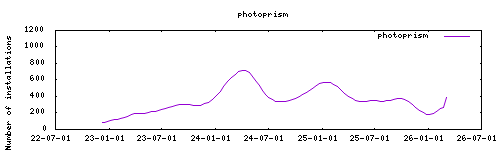
|
|
|
|
## About
|
|
|
|
A server-based application for browsing, organizing and sharing your personal photo collection.
|
|
|
|
Project homepage : https://github.com/photoprism/photoprism
|
|
|
|
Based on the docker image : https://hub.docker.com/r/photoprism/photoprism
|
|
|
|
## Installation
|
|
|
|
The installation of this add-on is pretty straightforward and not different in
|
|
comparison to installing any other Hass.io add-on.
|
|
|
|
1. [Add my Hass.io add-ons repository][repository] to your Hass.io instance.
|
|
1. Install this add-on.
|
|
1. Click the `Save` button to store your configuration.
|
|
1. Start the add-on.
|
|
1. Check the logs of the add-on to see if everything went well.
|
|
1. Carefully configure the add-on to your preferences, see the official documentation for for that.
|
|
|
|
## Configuration
|
|
|
|
Use the add-on `env_vars` option to pass extra environment variables (uppercase or lowercase names). See https://github.com/alexbelgium/hassio-addons/wiki/Add-Environment-variables-to-your-Addon-2 for details.
|
|
|
|
Webui can be found at <http://homeassistant:2342> or through the sidebar using Ingress.
|
|
Configurations can be done through the app webUI, except for the following options.
|
|
|
|
**System Requirements**: Minimum 2 cores and 4GB RAM
|
|
**Default Credentials**:
|
|
- Username: admin
|
|
- Password: please_change_password
|
|
|
|
**WebDAV Access**: Use URL `http://local-ip:addon-port/api/hassio.../originals` (see addon logs for full path)
|
|
|
|
### Options
|
|
|
|
| Option | Type | Default | Description |
|
|
|--------|------|---------|-------------|
|
|
| `ssl` | bool | `false` | Enable HTTPS for the web interface |
|
|
| `certfile` | str | `fullchain.pem` | SSL certificate file (must be in /ssl) |
|
|
| `keyfile` | str | `privkey.pem` | SSL key file (must be in /ssl) |
|
|
| `DB_TYPE` | list | `sqlite` | Database type (sqlite/mariadb_addon/external) |
|
|
| `ORIGINALS_PATH` | str | `/share/photoprism/originals` | Photo and video collection path |
|
|
| `STORAGE_PATH` | str | `/share/photoprism/storage` | Cache, database and sidecar files path |
|
|
| `IMPORT_PATH` | str | `/share/photoprism/import` | Import files path |
|
|
| `BACKUP_PATH` | str | `/share/photoprism/backup` | Backup storage path |
|
|
| `UPLOAD_NSFW` | bool | `true` | Allow uploads that may be offensive |
|
|
| `CONFIG_LOCATION` | str | | Location of additional config.yaml |
|
|
| `graphic_drivers` | list | | Graphics driver (mesa) |
|
|
| `ingress_disabled` | bool | | Disable ingress for direct IP:port access |
|
|
| `localdisks` | str | | Local drives to mount (e.g., `sda1,sdb1,MYNAS`) |
|
|
| `networkdisks` | str | | SMB shares to mount (e.g., `//SERVER/SHARE`) |
|
|
| `cifsusername` | str | | SMB username for network shares |
|
|
| `cifspassword` | str | | SMB password for network shares |
|
|
| `cifsdomain` | str | | SMB domain for network shares |
|
|
|
|
### Example Configuration
|
|
|
|
```yaml
|
|
ssl: false
|
|
certfile: "fullchain.pem"
|
|
keyfile: "privkey.pem"
|
|
DB_TYPE: "mariadb_addon"
|
|
ORIGINALS_PATH: "/media/photos"
|
|
STORAGE_PATH: "/share/photoprism/storage"
|
|
IMPORT_PATH: "/share/photoprism/import"
|
|
BACKUP_PATH: "/share/photoprism/backup"
|
|
UPLOAD_NSFW: true
|
|
localdisks: "sda1,sdb1"
|
|
networkdisks: "//192.168.1.100/photos"
|
|
cifsusername: "photouser"
|
|
cifspassword: "password123"
|
|
cifsdomain: "workgroup"
|
|
```
|
|
|
|
### Advanced Configuration
|
|
|
|
Additional options can be configured in `/config/addons_config/photoprism/config.yaml`.
|
|
Complete list: https://github.com/photoprism/photoprism/blob/develop/docker-compose.yml
|
|
|
|
### External Database Setup
|
|
|
|
For external database, add to `addons_config/photoprism/config.yaml`:
|
|
|
|
```yaml
|
|
PHOTOPRISM_DATABASE_DRIVER: "mysql"
|
|
PHOTOPRISM_DATABASE_SERVER: "IP:PORT"
|
|
PHOTOPRISM_DATABASE_NAME: "photoprism"
|
|
PHOTOPRISM_DATABASE_USER: "USERNAME"
|
|
PHOTOPRISM_DATABASE_PASSWORD: "PASSWORD"
|
|
```
|
|
|
|
### Mounting Drives
|
|
|
|
This addon supports mounting both local drives and remote SMB shares:
|
|
|
|
- **Local drives**: See [Mounting Local Drives in Addons](https://github.com/alexbelgium/hassio-addons/wiki/Mounting-Local-Drives-in-Addons)
|
|
- **Remote shares**: See [Mounting Remote Shares in Addons](https://github.com/alexbelgium/hassio-addons/wiki/Mounting-remote-shares-in-Addons)
|
|
## Using Photoprism Command-Line Interface
|
|
|
|
Photoprism also provides a command line interface:
|
|
|
|
https://docs.photoprism.app/getting-started/docker-compose/#command-line-interface
|
|
|
|
You can access it via portainer addon or executing `docker exec -it <photoprism container id> bash` via _ssh_.
|
|
|
|
:warning: Do not use `docker exec <photoprism container id> photoprism` as this will lead to unpredictable behavior.
|
|
|
|
## Illustration
|
|
|
|

|
|
|
|
## Support
|
|
|
|
Create an issue on github
|
|
|
|
[repository]: https://github.com/alexbelgium/hassio-addons
|
|
|
|
|