mirror of
https://github.com/alexbelgium/hassio-addons.git
synced 2026-01-09 17:31:03 +01:00

273 lines
13 KiB
Markdown
273 lines
13 KiB
Markdown
# Home assistant add-on: qbittorrent
|
|
|
|
|
|
I maintain this and other Home Assistant add-ons in my free time: keeping up with upstream changes, HA changes, and testing on real hardware takes a lot of time (and some money). I use around 5-10 of my >110 addons so regularly I install test machines (and purchase some test services such as vpn) that I don't use myself to troubleshoot and improve the addons
|
|
|
|
If this add-on saves you time or makes your setup easier, I would be very grateful for your support!
|
|
|
|
[![Buy me a coffee][donation-badge]](https://www.buymeacoffee.com/alexbelgium)
|
|
[![Donate via PayPal][paypal-badge]](https://www.paypal.com/donate/?hosted_button_id=DZFULJZTP3UQA)
|
|
|
|
## Addon informations
|
|
|
|

|
|

|
|

|
|
|
|
[](https://www.codacy.com/gh/alexbelgium/hassio-addons/dashboard?utm_source=github.com&utm_medium=referral&utm_content=alexbelgium/hassio-addons&utm_campaign=Badge_Grade)
|
|
[](https://github.com/alexbelgium/hassio-addons/actions/workflows/weekly-supelinter.yaml)
|
|
[](https://github.com/alexbelgium/hassio-addons/actions/workflows/onpush_builder.yaml)
|
|
|
|
[donation-badge]: https://img.shields.io/badge/Buy%20me%20a%20coffee-%23d32f2f?logo=buy-me-a-coffee&style=flat&logoColor=white
|
|
[paypal-badge]: https://img.shields.io/badge/Donate%20via%20PayPal-0070BA?logo=paypal&style=flat&logoColor=white
|
|
|
|
_Thanks to everyone having starred my repo! To star it click on the image below, then it will be on top right. Thanks!_
|
|
|
|
[](https://github.com/alexbelgium/hassio-addons/stargazers)
|
|
|
|
|
|
|
|
## About
|
|
|
|
---
|
|
|
|
[Qbittorrent](https://github.com/qbittorrent/qBittorrent) is a cross-platform free and open-source BitTorrent client.
|
|
This addon is based on the docker image from [linuxserver.io](https://www.linuxserver.io/).
|
|
|
|
This addons has several configurable options :
|
|
|
|
- allowing to mount local external drive, or smb share from the addon
|
|
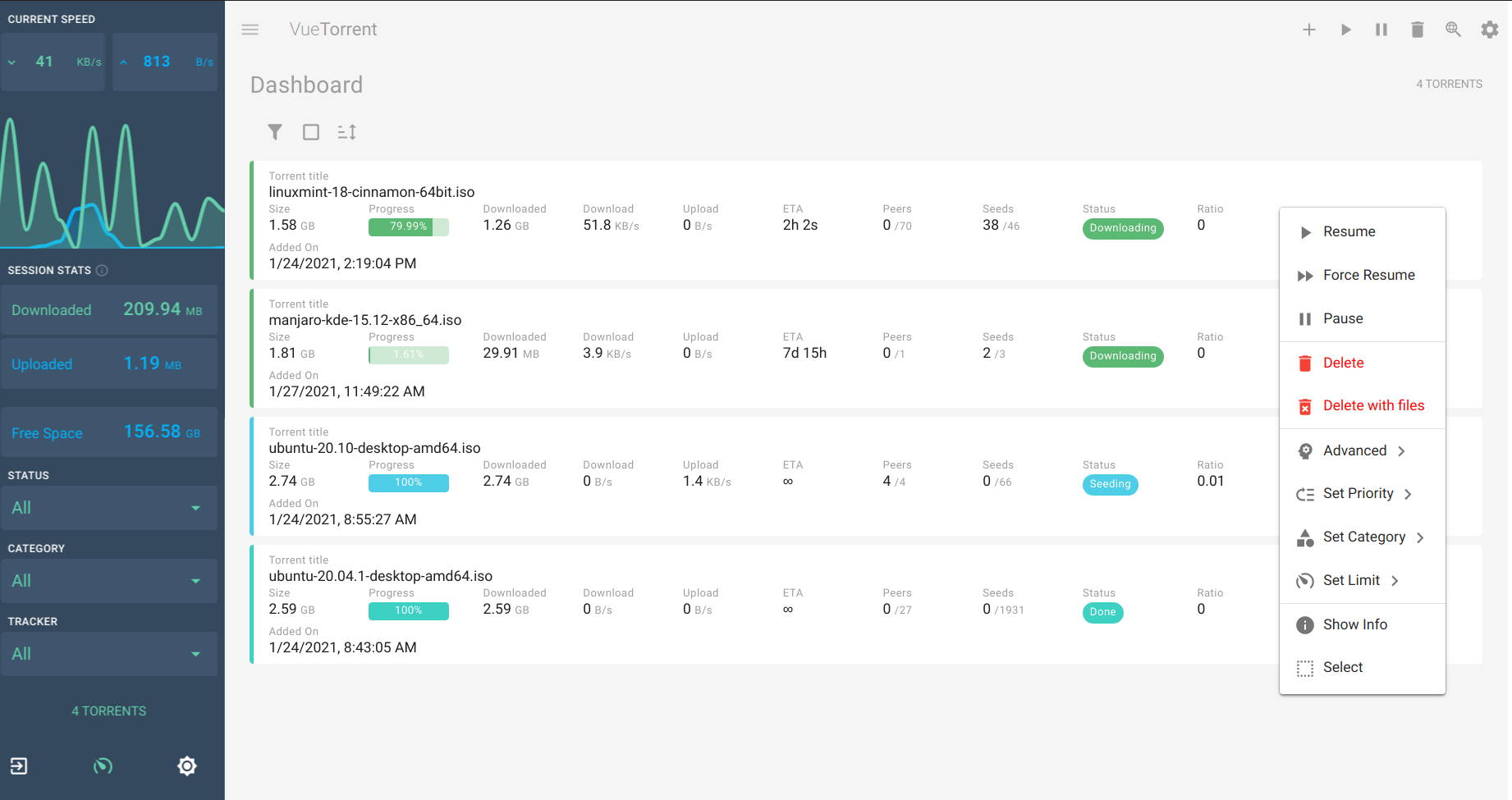
- [alternative webUI](https://github.com/qbittorrent/qBittorrent/wiki/List-of-known-alternate-WebUIs)
|
|
- usage of ssl
|
|
- ingress
|
|
- optional OpenVPN or WireGuard support
|
|
- allow setting specific DNS servers
|
|
|
|
## Configuration
|
|
|
|
---
|
|
|
|
Webui can be found at <http://homeassistant:8080>, or in your sidebar using Ingress.
|
|
The default username/password is described in the startup log.
|
|
|
|
Network disk is mounted to `/mnt/<share_name>`. You need to map the exposed port in your router for best speed and connectivity.
|
|
|
|
### Options
|
|
|
|
| Option | Type | Default | Description |
|
|
|--------|------|---------|-------------|
|
|
| `PGID` | int | `0` | Group ID for file permissions |
|
|
| `PUID` | int | `0` | User ID for file permissions |
|
|
| `TZ` | str | | Timezone (e.g., `Europe/London`) |
|
|
| `Username` | str | `admin` | Admin username for web interface |
|
|
| `SavePath` | str | `/share/qBittorrent` | Default download directory |
|
|
| `ssl` | bool | `false` | Enable HTTPS for web interface |
|
|
| `certfile` | str | `fullchain.pem` | SSL certificate file (in `/ssl/`) |
|
|
| `keyfile` | str | `privkey.pem` | SSL private key file (in `/ssl/`) |
|
|
| `whitelist` | str | `localhost,127.0.0.1,...` | IP subnets that don't need password |
|
|
| `customUI` | list | `vuetorrent` | Alternative web UI (default/vuetorrent/qbit-matUI/qb-web/custom) |
|
|
| `DNS_server` | str | `8.8.8.8,1.1.1.1` | Custom DNS servers |
|
|
| `localdisks` | str | | Local drives to mount (e.g., `sda1,sdb1,MYNAS`) |
|
|
| `networkdisks` | str | | SMB shares to mount (e.g., `//SERVER/SHARE`) |
|
|
| `cifsusername` | str | | SMB username for network shares |
|
|
| `cifspassword` | str | | SMB password for network shares |
|
|
| `cifsdomain` | str | | SMB domain for network shares |
|
|
| `openvpn_enabled` | bool | `false` | Enable OpenVPN connection |
|
|
| `openvpn_config` | str | | OpenVPN config file name (in `/config/openvpn/`) |
|
|
| `openvpn_username` | str | | OpenVPN username |
|
|
| `openvpn_password` | str | | OpenVPN password |
|
|
| `openvpn_alt_mode` | bool | `false` | Bind at container level instead of app level |
|
|
| `wireguard_enabled` | bool | `false` | Enable WireGuard tunnel |
|
|
| `wireguard_config` | str | _(empty)_ | WireGuard config file name (in `/config/wireguard/`) |
|
|
| `qbit_manage` | bool | `false` | Enable qBit Manage integration |
|
|
| `run_duration` | str | | Run duration (e.g., `12h`, `5d`) |
|
|
| `silent` | bool | `false` | Suppress debug messages |
|
|
|
|
### WireGuard Setup
|
|
|
|
WireGuard configuration files must be stored in `/config/wireguard`. If several `.conf` files are present, set `wireguard_config` to the file name you want to use (for example `wg0.conf`). Expose UDP port `51820` in the add-on options and forward it from your router only when your tunnel expects inbound peers (for example, site-to-site setups). Outbound-only commercial VPN providers usually do not require a mapped port. The runtime configuration now preserves both IPv4 and IPv6 entries, so you can use dual-stack WireGuard peers when your endpoint supports them.
|
|
|
|
### Example Configuration
|
|
|
|
```yaml
|
|
PGID: 0
|
|
PUID: 0
|
|
TZ: "Europe/London"
|
|
Username: "admin"
|
|
SavePath: "/share/qBittorrent"
|
|
ssl: true
|
|
certfile: "fullchain.pem"
|
|
keyfile: "privkey.pem"
|
|
whitelist: "localhost,192.168.0.0/16"
|
|
customUI: "vuetorrent"
|
|
DNS_server: "8.8.8.8,1.1.1.1"
|
|
localdisks: "sda1,sdb1"
|
|
networkdisks: "//192.168.1.100/downloads"
|
|
cifsusername: "username"
|
|
cifspassword: "password"
|
|
openvpn_enabled: false
|
|
wireguard_enabled: false
|
|
```
|
|
|
|
### Mounting Drives
|
|
|
|
This addon supports mounting both local drives and remote SMB shares:
|
|
|
|
- **Local drives**: See [Mounting Local Drives in Addons](https://github.com/alexbelgium/hassio-addons/wiki/Mounting-Local-Drives-in-Addons)
|
|
- **Remote shares**: See [Mounting Remote Shares in Addons](https://github.com/alexbelgium/hassio-addons/wiki/Mounting-remote-shares-in-Addons)
|
|
|
|
### Custom Scripts and Environment Variables
|
|
|
|
This addon supports custom scripts and environment variables through the `addon_config` mapping:
|
|
|
|
- **Custom scripts**: See [Running Custom Scripts in Addons](https://github.com/alexbelgium/hassio-addons/wiki/Running-custom-scripts-in-Addons)
|
|
- **env_vars option**: Use the add-on `env_vars` option to pass extra environment variables (uppercase or lowercase names). See https://github.com/alexbelgium/hassio-addons/wiki/Add-Environment-variables-to-your-Addon-2 for details.
|
|
|
|
## Installation
|
|
|
|
---
|
|
|
|
The installation of this add-on is pretty straightforward and not different in comparison to installing any other add-on.
|
|
|
|
1. Add my add-ons repository to your home assistant instance (in supervisor addons store at top right, or click button below if you have configured my HA)
|
|
[](https://my.home-assistant.io/redirect/supervisor_add_addon_repository/?repository_url=https%3A%2F%2Fgithub.com%2Falexbelgium%2Fhassio-addons)
|
|
1. Install this add-on.
|
|
1. Click the `Save` button to store your configuration.
|
|
1. Set the add-on options to your preferences
|
|
1. Start the add-on.
|
|
1. Check the logs of the add-on to see if everything went well.
|
|
1. Open the webUI and adapt the software options
|
|
|
|
## Integration with HA
|
|
|
|
Use the [qBittorrent integration](https://www.home-assistant.io/integrations/qbittorrent/)
|
|
|
|
You can use the following snippets to check and set the alternate speeds (the HA integration above is not needed for this)
|
|
|
|
```bash
|
|
shell_command:
|
|
toggle_torrent_speed: curl -X POST https://<YOUR HA IP>:8081/api/v2/transfer/toggleSpeedLimitsMode -k
|
|
sensor:
|
|
- platform: command_line
|
|
name: get_torrent_speed
|
|
command: curl https://<YOUR HA IP>:8081/api/v2/transfer/speedLimitsMode -k
|
|
```
|
|
|
|
If you're not using the SSL option, you can skip the -k parameter and use http instead of https in the URL
|
|
|
|
These lines will expose a `sensor.get_torrent_speed` that updates every 60 seconds and returns 1 if the alternate speed mode is enabled, 0 otherwise, and a `shell_command.toggle_torrent_speed` that you can call as a Service in your automations
|
|
|
|
## Common issues
|
|
|
|
<details>
|
|
<summary>### ipv6 issues with openvpn (@happycoo)</summary>
|
|
Add this code to your .ovpn config
|
|
|
|
```bash
|
|
# don't route lan through vpn
|
|
route 192.168.1.0 255.255.255.0 net_gateway
|
|
|
|
# deactivate ipv6
|
|
pull-filter ignore "dhcp-option DNS6"
|
|
pull-filter ignore "tun-ipv6"
|
|
pull-filter ignore "ifconfig-ipv6"
|
|
```
|
|
|
|
</details>
|
|
|
|
<details>
|
|
<summary>### 100% cpu</summary>
|
|
Delete your nova3 folder in /config and restart qbittorrent
|
|
|
|
</details>
|
|
|
|
<details>
|
|
<summary>### WireGuard connection fails</summary>
|
|
|
|
- If your deployment expects inbound peers, verify that the UDP port exposed in the add-on options maps 51820/udp and is forwarded by your router. Skip this step for outbound-only commercial VPN providers.
|
|
- Confirm that the selected configuration file in `/config/wireguard` matches the `wireguard_config` option (or that only one `.conf` file is present).
|
|
- Check the add-on logs for the detailed `wg-quick` error message printed by the startup routine.
|
|
- Hosts missing the iptables `comment` kernel module are automatically retried without comment matches and, when available, using the legacy iptables backend. Inspect the log for messages about these fallbacks if you see iptables-restore errors.
|
|
- Dual-stack WireGuard peers are supported. If you see ip6tables-restore errors, confirm that your host provides IPv6 firewall support or adjust your configuration to match your environment.
|
|
- The startup scripts suppress the `net.ipv4.conf.all.src_valid_mark` sysctl failure emitted by `wg-quick` on some hosts, so persistent errors in the logs typically point to configuration or connectivity issues.
|
|
|
|
</details>
|
|
|
|
<details>
|
|
<summary>### Monitored folders (@FaliseDotCom)</summary>
|
|
|
|
- go to config\addons_config\qBittorrent
|
|
- find (or create) the file watched_folders.json
|
|
- paste or adjust to the following:
|
|
|
|
```json
|
|
{
|
|
"folder/to/watch": {
|
|
"add_torrent_params": {
|
|
"category": "",
|
|
"content_layout": "Original",
|
|
"download_limit": -1,
|
|
"download_path": "[folder/for/INCOMPLETE_downloads]",
|
|
"operating_mode": "AutoManaged",
|
|
"ratio_limit": -2,
|
|
"save_path": "[folder/for/COMPLETED_downloads]",
|
|
"seeding_time_limit": -2,
|
|
"skip_checking": false,
|
|
"stopped": false,
|
|
"tags": [],
|
|
"upload_limit": -1,
|
|
"use_auto_tmm": false,
|
|
"use_download_path": true
|
|
},
|
|
"recursive": false
|
|
}
|
|
}
|
|
```
|
|
|
|
</details>
|
|
|
|
<details>
|
|
<summary>### nginx error code (@Nanianmichaels)</summary>
|
|
|
|
> [cont-init.d] 30-nginx.sh: executing...
|
|
> [cont-init.d] 30-nginx.sh: exited 1.
|
|
|
|
Wait a couple minutes and restart addon, it could be a temporary unavailability of github
|
|
|
|
### Local mount with invalid argument (@antonio1475)
|
|
|
|
> [cont-init.d] 00-local_mounts.sh: executing...
|
|
> Local Disks mounting...
|
|
> mount: mounting /dev/sda1 on /mnt/sda1 failed: Invalid argument
|
|
> [19:19:44] FATAL: Unable to mount local drives! Please check the name.
|
|
> [cont-init.d] 00-local_mounts.sh: exited 0.
|
|
|
|
Try to mount by putting the partition label in the "localdisks" options instead of the hardware name
|
|
|
|
</details>
|
|
|
|
<details>
|
|
<summary>### Loss of metadata fetching with openvpn after several days (@almico)</summary>
|
|
|
|
Add `ping-restart 60` to your config.ovpn
|
|
|
|
</details>
|
|
|
|
<details>
|
|
<summary>### Downloads info are empty on small scale window (@aviadlevy)</summary>
|
|
|
|
When my window size width is lower than 960 pixels my downloads are empty.
|
|
Solution is to reset the Vuetorrent settings.
|
|
|
|
</details>
|
|
|
|
## Support
|
|
|
|
Create an issue on github, or ask on the [home assistant thread](https://community.home-assistant.io/t/home-assistant-addon-qbittorrent/279247)
|
|
|
|
---
|
|
|
|
|
|
|
|
|