mirror of
https://github.com/alexbelgium/hassio-addons.git
synced 2026-03-13 16:34:22 +01:00
 8a0f15413c
Add the "Add repository to my Home Assistant" blue button to all
addon README files that were missing it. This makes it easier for
new HA users to add the repository with a single click.

Updated 59 addon READMEs:
- 51 with standard Installation section format
- 8 with non-standard or missing Installation sections

Co-authored-by: alexbelgium <44178713+alexbelgium@users.noreply.github.com>
99 lines
5.5 KiB
Markdown
99 lines
5.5 KiB
Markdown
# Home assistant add-on: Omada
|
|
|
|
|
|
I maintain this and other Home Assistant add-ons in my free time: keeping up with upstream changes, HA changes, and testing on real hardware takes a lot of time (and some money). I use around 5-10 of my >110 addons so regularly I install test machines (and purchase some test services such as vpn) that I don't use myself to troubleshoot and improve the addons
|
|
|
|
If this add-on saves you time or makes your setup easier, I would be very grateful for your support!
|
|
|
|
[![Buy me a coffee][donation-badge]](https://www.buymeacoffee.com/alexbelgium)
|
|
[![Donate via PayPal][paypal-badge]](https://www.paypal.com/donate/?hosted_button_id=DZFULJZTP3UQA)
|
|
|
|
## Addon informations
|
|
|
|

|
|

|
|

|
|
|
|
[](https://www.codacy.com/gh/alexbelgium/hassio-addons/dashboard?utm_source=github.com&utm_medium=referral&utm_content=alexbelgium/hassio-addons&utm_campaign=Badge_Grade)
|
|
[](https://github.com/alexbelgium/hassio-addons/actions/workflows/weekly-supelinter.yaml)
|
|
[](https://github.com/alexbelgium/hassio-addons/actions/workflows/onpush_builder.yaml)
|
|
|
|
[donation-badge]: https://img.shields.io/badge/Buy%20me%20a%20coffee-%23d32f2f?logo=buy-me-a-coffee&style=flat&logoColor=white
|
|
[paypal-badge]: https://img.shields.io/badge/Donate%20via%20PayPal-0070BA?logo=paypal&style=flat&logoColor=white
|
|
|
|
_Thanks to everyone having starred my repo! To star it click on the image below, then it will be on top right. Thanks!_
|
|
|
|
[](https://github.com/alexbelgium/hassio-addons/stargazers)
|
|
|
|
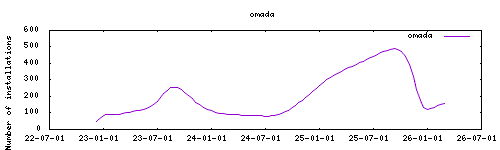
|
|
|
|
## Installation
|
|
|
|
1. Add my add-ons repository to your home assistant instance (in supervisor addons store at top right, or click button below if you have configured my HA)
|
|
[](https://my.home-assistant.io/redirect/supervisor_add_addon_repository/?repository_url=https%3A%2F%2Fgithub.com%2Falexbelgium%2Fhassio-addons)
|
|
1. Install this add-on.
|
|
1. Start the add-on.
|
|
1. Check the logs of the add-on to see if everything went well.
|
|
|
|
## ⚠️ Obsolete Addon Notice
|
|
|
|
**This addon is obsolete and no longer actively maintained.**
|
|
|
|
**Recommendation:** Please backup your database and migrate to the dedicated addon at https://github.com/jkunczik/home-assistant-omada
|
|
|
|
The recommended alternative:
|
|
- Is dedicated to Omada functionality
|
|
- Is in active development
|
|
- Should be more stable and feature-complete
|
|
- Has better community support
|
|
|
|
## About
|
|
|
|
This addon provided the TP-Link Omada Controller for managing TP-Link Omada networking equipment including access points, switches, and routers through a centralized web interface.
|
|
|
|
The Omada Controller allows you to:
|
|
- Manage multiple TP-Link Omada devices
|
|
- Configure wireless networks and VLANs
|
|
- Monitor network performance and usage
|
|
- Set up guest networks and access controls
|
|
- Manage firmware updates
|
|
- Generate network reports
|
|
|
|
## Migration Instructions
|
|
|
|
1. **Backup your current data:**
|
|
- Access your current Omada Controller
|
|
- Export your configuration and settings
|
|
- Note down all your network configurations
|
|
|
|
2. **Install the recommended addon:**
|
|
- Add the repository: https://github.com/jkunczik/home-assistant-omada
|
|
- Install the new Omada addon
|
|
- Follow their setup instructions
|
|
|
|
3. **Import your data:**
|
|
- Import your backed-up configuration
|
|
- Verify all devices are properly connected
|
|
- Test your network functionality
|
|
|
|
## Legacy Configuration
|
|
|
|
If you still need to use this addon temporarily:
|
|
|
|
Webui can be found at `<your-ip>:8088` (HTTP) or `<your-ip>:8043` (HTTPS).
|
|
|
|
### Custom Scripts and Environment Variables
|
|
|
|
This addon supports custom scripts and environment variables through the `addon_config` mapping:
|
|
|
|
- **Custom scripts**: See [Running Custom Scripts in Addons](https://github.com/alexbelgium/hassio-addons/wiki/Running-custom-scripts-in-Addons)
|
|
- **Environment variables**: Use the add-on `env_vars` option and see [Add Environment Variables to your Addon](https://github.com/alexbelgium/hassio-addons/wiki/Add-Environment-variables-to-your-Addon) for details.
|
|
|
|
## Support
|
|
|
|
For this legacy addon: Create an issue on github
|
|
|
|
For the recommended replacement: Visit https://github.com/jkunczik/home-assistant-omada
|
|
|
|
[repository]: https://github.com/alexbelgium/hassio-addons
|